
Teams

Rencore monitors Microsoft Teams across 24 governance policies, 7 reports, and 11 segments, detecting team sprawl, guest access risks, and inactive workspaces automatically.

Published For M365 Product Owner, IT Admin, Head of IT
Digital WorkplaceAI & Agents
Definition

Rencore Teams governance is a set of 24 policies, 7 reports, and 11 segments that continuously audit Microsoft Teams for sprawl, guest access violations, inactive teams, and naming standard drift. It identifies teams with external guests who have owner-level access, teams without recent activity that still consume resources, and naming convention violations, then routes each finding to the right owner for resolution.

See Teams in Rencore

Step 1 of 4

76 governance capabilities: 9 inventories · 24 policies · 7 reports · 11 segments · 5 automations · 8 provisioning templates

Why govern Teams with Rencore

Control team sprawl

Detect inactive teams (90+ days without posts or meetings), duplicate team names, and teams without owners. Prioritize cleanup by team age, member count, and storage consumed.

Manage guest access risks

Find teams where external guests have owner-level permissions, teams with excessive guest counts, or guests whose invitations have expired but access persists.

Enforce naming and creation standards

Flag teams that violate naming conventions, teams created without required metadata, and teams missing classification labels required by compliance policies.

Track adoption and usage

Reports show activity trends per team, most active channels, app usage distribution, and storage consumption, helping IT right-size their Teams environment.

What Rencore discovers

Rencore automatically inventories these Teams object types.
Team
All teams in your tenant
Channel
All Channels of the Team
Tab
All tabs of your teams in your tenant
App
All installed Teams apps in your tenant
Deleted Team
All teams that have been deleted
Usage
Details about Teams usage in the last 180 days
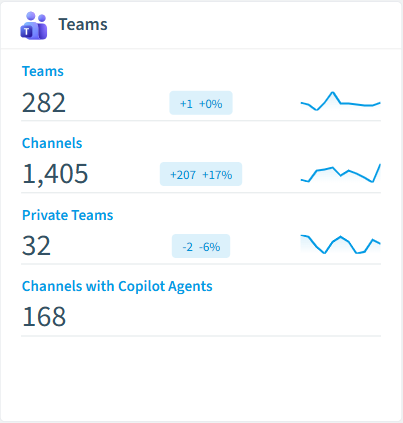
Teams inventory card in Rencore

How Teams governance works in Rencore

Rencore connects to Microsoft Teams via Microsoft Graph API and inventories every team, channel, and guest membership across the tenant. Policies evaluate each object against configurable governance rules and flag violations with severity, category, and recommended action.

Who uses Teams governance

M365 product owners use Teams governance to prevent workspace sprawl and enforce creation standards. IT administrators monitor guest access patterns and inactive teams to reduce security exposure. Heads of IT use the reports to justify governance investments with concrete sprawl and adoption data.

Getting started

Connect your Microsoft 365 tenant, and Teams policies activate within the first scan. Rencore uses read-only Microsoft Graph permissions, no Teams app installation or bot registration required. All 24 policies run automatically on every scan cycle.

Policies

24 governance rules that detect violations and risks.
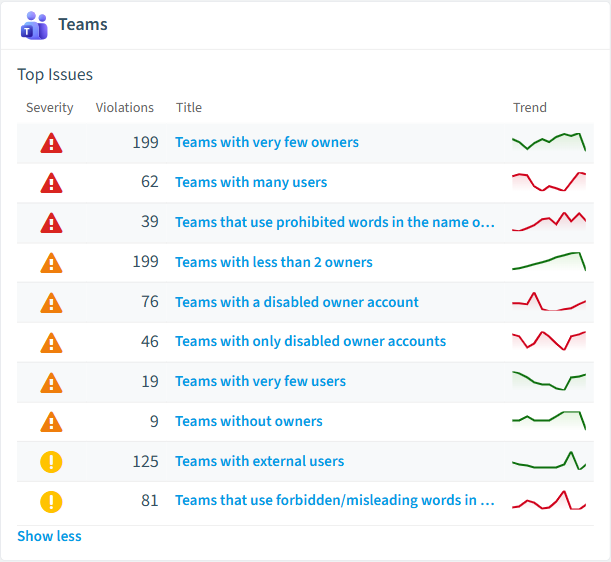
Teams policies card in Rencore
Teams with very few owners
Shows Teams which have 1 or no owner
High Operation
Teams with many users
Shows Teams with a number of users that exceeds a threshold (default 50 users)
High Operation
Teams that use prohibited words in the name or description
Shows teams that use a list of prohibited words in the name or description
High Operation
Team contains Copilot agent and external members
Detects Team where a Copilot agent is installed and external users are present, posing security concerns.
High Security
Public team
Public teams can be discovered and joined by anyone in the organization, raising the likelihood of exposure.
Medium Operation
Team has many members
Teams with a large membership have a wider audience, raising the likelihood of exposure.
Medium Operation

Need a rule that isn't listed? Rencore's Policy Builder lets you create custom policies tailored to your organization.

Reports

7 analytics views and dashboards.
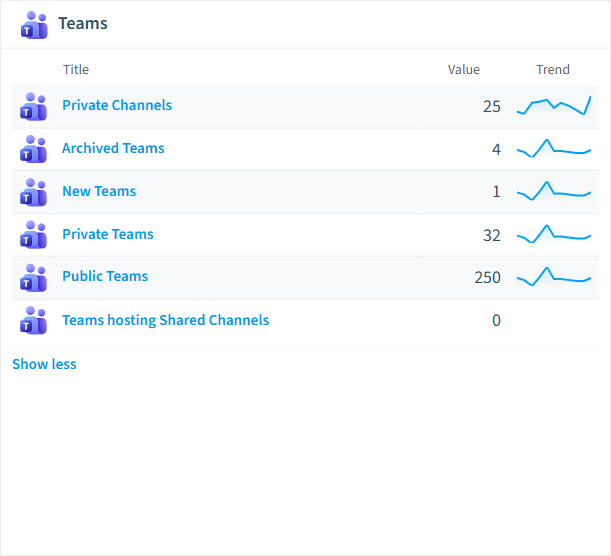
Archived Teams
All Teams that have been archived
List · Uncategorized
New Teams
All Teams scanned the first time in the last 14 days
List · Uncategorized
Private Teams
All Teams that are marked as private
List · Uncategorized
Public Teams
All teams that are visible to everyone in the organization
List · Uncategorized
Private Channels
All private channels in Teams
List · Uncategorized
Teams Pre-Scan
Regular scans for a large amount of Teams may require dedicated database in Rencore Governance
Donut Chart · Operation
Teams reports card in Rencore

Automations

5 automated remediation workflows.

Set teams to private by default
Sets public teams to private and informs teams owners about the change
Mark teams with external users
Add External indicator to team title if a team contains external users.
Archive unused teams
Automatically archives unused MS Teams teams
Send one email per Team owner
Send an email to every owner of one Microsoft Teams team and directly addresses the user by first and last name
Send a combined email to all owners of a Team
Send a single (combined) email to the owners of one Microsoft Teams team

Segments

11 data groupings for targeted filtering.

Archived TeamsNew TeamsPrivate TeamsPublic TeamsPrivate ChannelsShared ChannelsStore AppsOrganization appsAgents published to Teams app catalogTeams with AgentsChannels with Copilot Agents

Provisioning templates

8 resource creation templates.

Custom Team
Start with an empty Team and configure policies, channels and apps from scratch
Manage a Project
Manage tasks, share documents, conduct project meetings and document risks and decisions with this template for general project management.
Department Workspace
Manage communication inside a department with a team for chat based communication and a SharePoint site for document collaboration.
Manage an Event
Manage tasks, documents, and collaborate on everything you need to deliver a compelling event. Invite guest users to have a secure collaboration inside and outside of your company.
Onboard Employees
Improve your culture and streamline your employee onboarding with this central team for resources, questions, and a bit of fun.
Product Development Workspace
Work together in product development, organize tasks, meeting notes and documents.
Organize Help Desk
Collaborate on documentation, policy, and processes that support your help desk. Integrate your existing ticketing system or use our template to manage requests.
Private Team
Use this template for internal collaboration with your colleagues, to discuss topics, share ideas and documents.

Frequently asked questions

What is Teams governance?
Teams governance is the practice of controlling team creation, guest access, naming standards, and lifecycle across Microsoft Teams. It prevents sprawl (abandoned teams, duplicate workspaces), reduces security risks (external guests with excessive access), and keeps the collaboration environment auditable and compliant with organizational policies.
Can Rencore govern Microsoft Teams?
Yes. Rencore provides 22 Teams-specific governance policies, 7 reports, and 8 segments that cover team sprawl, guest access, inactive teams, naming conventions, and app permissions. Rencore discovers Teams objects and applies policies automatically to detect governance violations across your entire tenant.
What is Rencore governance?
Rencore governance is a SaaS platform that continuously monitors your Microsoft 365 tenant for policy violations, configuration drift, and security risks across SharePoint, Teams, Power Platform, Copilot, and AI Agents. It automates compliance evidence collection, surfaces oversharing and sprawl, and provides actionable remediation workflows, reducing manual audit effort by up to 80%.

Related guides

Trusted by

MAPALBAMVille de LuxembourgWACKERGRUNDFOSAMGENOsramLufthansaThyssenKruppSunrisePattern







