 Rencore

Windsurf
Rencore monitors Windsurf across 11 governance policies, 3 reports, and 8 inventories, detecting unused seats, cost overruns, and adoption gaps automatically.
Windsurf is in private preview. Join the waiting list and we will reach out when access opens up.
Join the waiting listRencore Windsurf governance is a set of 11 policies, 3 reports, 5 segments, and 8 inventories that audit Codeium's Windsurf AI coding IDE for seat waste, cost overruns, and usage issues. It detects inactive members consuming paid seats, Cascade agentic runs exceeding budget thresholds, chat sessions indicating adoption problems, and audit events requiring security review.
32 governance capabilities: 8 inventories · 11 policies · 3 reports · 5 segments · 2 automations
Why govern Windsurf with Rencore
-
Optimize seat utilization
Detect members inactive for 90+ days, seats assigned to users deactivated in Entra ID, and teams where actual usage is below the seat allocation. Reclaim wasted licenses.
-
Track Cascade agentic usage
Monitor Cascade agentic runs, chat sessions, and model usage across the organization. Reports show which teams use Windsurf most and which models drive the highest engagement.
-
Review security events
Inventory audit events and detect usage patterns that require security review. Policies flag anomalous activity and accounts with access beyond organizational policy.
What Rencore discovers
Rencore automatically inventories these Windsurf object types.
-
Windsurf Team
A Windsurf team (workspace); top-level container for members, seats, usage, cascade runs, chat sessions, and models.
-
Windsurf Member
Individual accounts with access to a Windsurf team.
-
Windsurf Seat
A Windsurf seat assignment on the team license.
-
Windsurf Daily Usage
Daily usage rollup per member; completions, chat, cascade runs, credits, top model.
-
Windsurf Cascade Run
A single Cascade (agentic run) invocation; model, duration, tool calls, credits.
-
Windsurf Chat Session
An inline chat conversation; message count, primary model, credits.
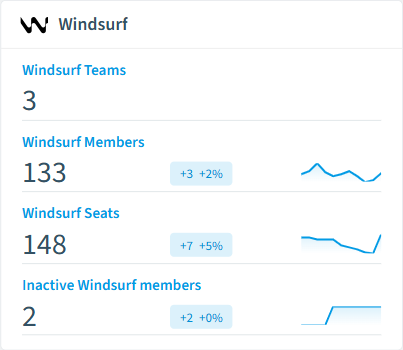
How Windsurf governance works in Rencore
Rencore connects to Windsurf via the Codeium API and inventories members, seats, Cascade agentic runs, chat sessions, model usage, and audit events. Policies run on every scan cycle and flag seat waste, cost overruns, and security issues.
Who uses Windsurf governance
Heads of IT use seat utilization policies to justify Windsurf spend and recover unused seats. CISOs review audit events and access policies to enforce security boundaries. Engineering leads use adoption reports to compare Windsurf usage with other AI coding tools.
Getting started
Provide Rencore with Windsurf API credentials. All 11 policies activate on first scan, covering members, seats, and usage data automatically.
Policies
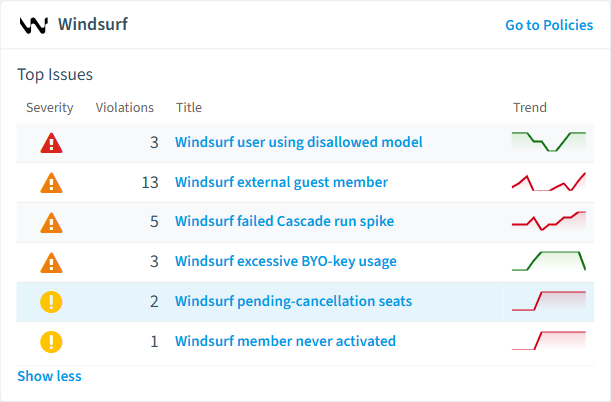
11 governance rules that detect violations and risks.
-
Windsurf user using disallowed model
Detects use of models not on the approved allowlist.
High Adoption -
Windsurf member deactivated in Entra ID
Detects Windsurf members who are deactivated in the parent Entra ID.
Medium Security -
Windsurf team has too many admins
Detects Windsurf teams with more than 5 admins.
Medium Security -
Windsurf external guest member
Detects Windsurf members that are external users in Entra ID.
Medium Security -
Windsurf failed Cascade run spike
Detects Cascade runs that failed; investigate prompt or model issues.
Medium Operation -
Windsurf inactive seat still billed
Detects active seats whose member has not been active in the last 30 days.
Medium Costs
Need a rule that isn't listed? Rencore's Policy Builder lets you create custom policies tailored to your organization. Learn more about the Policy Builder
Reports
3 analytics views and dashboards.
-
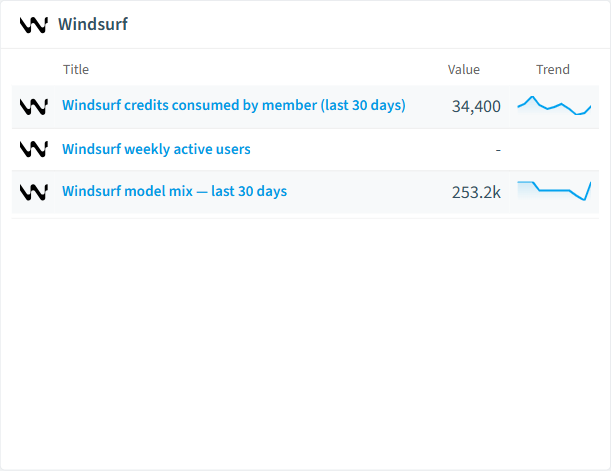
Windsurf credits consumed by member (last 30 days)
Top 10 members by credits consumed in the last 30 days.
Bar Chart · Costs
-
Windsurf weekly active users
Distinct active members per week over the last year.
Line Chart · Operation
-
Windsurf model mix; last 30 days
Distribution of requests across models in the last 30 days.
Donut Chart · Operation
Automations
2 automated remediation workflows.
-
Remove Windsurf Member
Automatically removes a member from the Windsurf team after approval
-
Revoke Windsurf Seat
Automatically revokes a Windsurf seat after approval
Segments
5 data groupings for targeted filtering.
-
Inactive Windsurf members
Members that have not been active in the last 30 days.
-
Windsurf team admins
Members with admin role on the Windsurf team.
-
External guest Windsurf members
Windsurf members linked to external/guest Entra ID accounts.
-
High-credit Windsurf members
Members whose 30-day credit burn exceeds 10,000.
-
Windsurf BYO-key models
Models predominantly served via user-supplied API keys.
Frequently asked questions
Does Rencore support governance for AI tools beyond Microsoft Copilot?
What is Rencore governance?
How do Rencore policies work?
Trusted by











