 Rencore

Slack
Rencore monitors Slack across 25 governance policies, 8 reports, and 10 inventories, detecting channel sprawl, orphaned guest access, and file sharing risks automatically.
Slack is in private preview. Join the waiting list and we will reach out when access opens up.
Join the waiting listRencore Slack governance is a set of 25 policies, 8 reports, 14 segments, and 10 inventories that continuously audit Slack workspaces for channel sprawl, guest access violations, file sharing risks, and user lifecycle issues. It detects members deactivated in Entra ID who retain Slack access, workspaces with too many admins, external guest members without business justification, and files shared via public URLs.
74 governance capabilities: 10 inventories · 25 policies · 8 reports · 14 segments · 9 automations
Why govern Slack with Rencore
-
Control channel sprawl
Detect inactive channels without messages in 90+ days, channels without purpose descriptions, and archived channels still consuming workspace resources. Automate cleanup with approval workflows.
-
Manage guest access
Find external guest members without business justification, guests with access to too many channels, and members deactivated in Entra ID who still have active Slack accounts.
-
Secure file sharing
Detect files shared via public URLs, files with external access beyond policy, and workspaces where file sharing settings bypass organizational data protection controls.
-
Enforce workspace standards
Flag workspaces with too many admins, workspaces missing required app restrictions, and user groups with stale membership. 25 policies cover every aspect of Slack governance.
What Rencore discovers
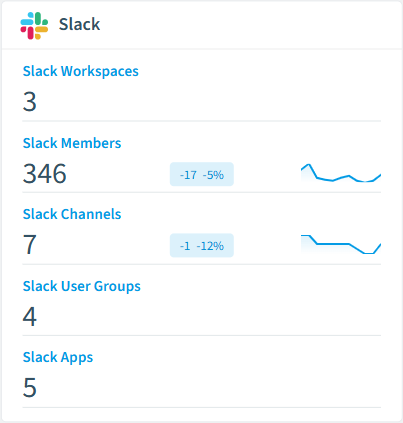
Rencore automatically inventories these Slack object types.
-
Slack Workspace
A Slack workspace; top-level container for members, channels, user groups, apps and files.
-
Slack Member
Individual accounts with access to a Slack workspace.
-
Slack Channel
A Slack channel; public, private, shared or multi-party DM.
-
Slack User Group
A Slack user group (formerly IDP group).
-
Slack App
A Slack app installed in the workspace.
-
Slack File
A file uploaded to a Slack workspace.
How Slack governance works in Rencore
Rencore connects to Slack via the Slack API and inventories workspaces, members, channels, user groups, apps, and files. It links Slack members to M365 users by email for cross-platform identity governance. Policies run on every scan cycle and flag sprawl, access, and sharing issues.
The multi-platform messaging challenge
Organizations using Slack alongside Microsoft Teams face fragmented messaging governance. A guest in Slack may already be terminated in Entra ID but invisible to Teams-focused governance. Rencore governs both platforms from a single dashboard, detecting identity mismatches that span messaging tools.
Who uses Slack governance
IT administrators use it to maintain clean workspace hygiene and manage channel lifecycle. CISOs rely on guest access and file sharing policies to detect data exposure risks. Heads of IT use the reports to compare messaging governance posture between Slack and Teams.
Getting started
Provide Rencore with Slack API credentials (OAuth tokens). All 25 policies activate on first scan, covering workspaces, channels, members, and files. Rencore links Slack members to Entra ID automatically.
Policies
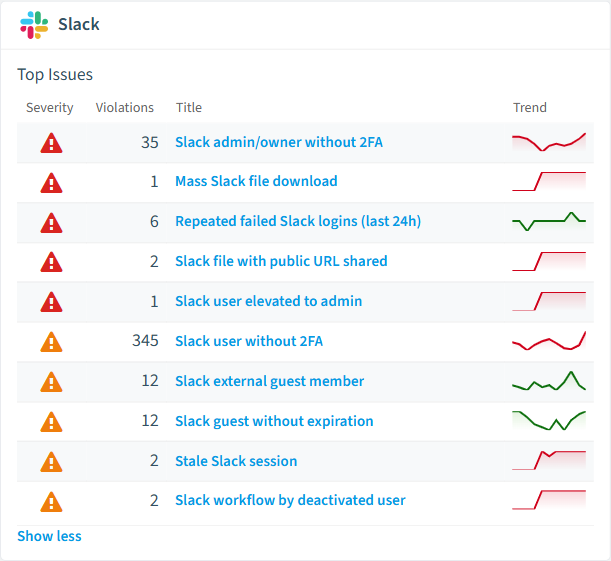
25 governance rules that detect violations and risks.
-
Slack file with public URL shared
Detects Slack files with a public shareable URL.
High Security -
Slack app with sensitive scopes (unapproved)
Detects Slack apps holding sensitive scopes that are neither directory-approved nor internal.
High Security -
Private Slack channel shared externally
Detects private Slack channels that are shared with external organizations.
High Security -
Repeated failed Slack logins (last 24h)
Detects Slack login_failed audit events in the last 24 hours.
High Security -
Slack user elevated to admin
Detects Slack role_change_to_admin audit events in the last 7 days.
High Security -
Slack login without geolocation
Detects Slack user_login audit events in the last 7 days with no resolved country.
High Security
Need a rule that isn't listed? Rencore's Policy Builder lets you create custom policies tailored to your organization. Learn more about the Policy Builder
Reports
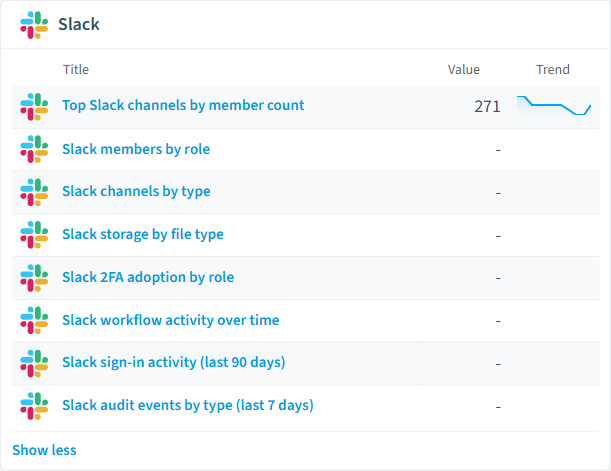
8 analytics views and dashboards.
-
Slack members by role
Distribution of Slack members across owner, admin, member, guest and bot roles.
Donut Chart · Operation
-
Slack channels by type
Distribution of active Slack channels across public, private, shared and external-shared.
Donut Chart · Operation
-
Slack storage by file type
Total file size by Slack file type across the workspace.
Bar Chart · Costs
-
Slack 2FA adoption by role
Count of active Slack members by role, broken down by whether 2FA is enabled.
Bar Chart · Security
-
Top Slack channels by member count
The 20 largest active Slack channels by member count.
Bar Chart · Adoption
-
Slack workflow activity over time
Count of Slack workflows updated per month over the last 12 months.
Line Chart · Adoption
Automations
9 automated remediation workflows.
-
Remove Slack Member
Automatically removes a member from the Slack workspace after approval
-
Archive Slack Channel
Automatically archives a Slack channel after approval
-
Remove Slack App
Automatically removes a Slack app from the workspace after approval
-
Delete Slack File
Automatically deletes a Slack file after approval
-
Revoke Slack Session
Automatically revokes an active Slack session after approval
-
Set Slack User Expiration
Automatically sets an expiration timestamp on a Slack guest member after approval
-
Remove User from Slack Channel
Automatically removes a member from a Slack channel after approval
-
Disable Slack User Group
Automatically disables a Slack user group after approval
-
Unpublish Slack Workflow
Automatically unpublishes a Slack workflow after approval
Segments
14 data groupings for targeted filtering.
-
Deactivated Slack members
Slack members flagged as deleted in the workspace.
-
Slack workspace admins
Slack members with admin or owner privileges.
-
Slack guest members
Slack members marked as multi-channel or single-channel guests.
-
External-shared Slack channels
Slack channels shared with one or more external organizations.
-
Public Slack files
Slack files that have a public shareable URL.
-
Slack users without 2FA
Active, non-bot Slack members without two-factor authentication enabled.
-
Slack admins without 2FA
Slack admins or owners without two-factor authentication enabled.
-
Active Slack sessions (last 7 days)
Slack sessions with activity within the last 7 days.
-
Slack apps with sensitive scopes
Slack apps holding sensitive OAuth scopes (e.g. files:read, admin).
-
Published Slack workflows
Slack workflows that have been published and are runnable.
-
Slack guests without expiration
Slack guest members without an expiration timestamp set.
-
Failed Slack logins (last 7 days)
Slack login_failed audit events in the last 7 days.
-
External Slack file shares (last 30 days)
Slack file_shared_externally audit events in the last 30 days.
-
Slack role elevations (last 30 days)
Slack role_change_to_admin audit events in the last 30 days.
Frequently asked questions
What governance areas does Rencore cover?
What is Rencore governance?
How do Rencore policies work?
Trusted by











