 Rencore

ServiceNow
Rencore monitors ServiceNow across 29 governance policies, 10 reports, and 15 inventories, detecting AI agent risks, access issues, and instance sprawl automatically.
ServiceNow is in private preview. Join the waiting list and we will reach out when access opens up.
Join the waiting listRencore ServiceNow governance is a set of 29 policies, 10 reports, 15 segments, and 15 inventories that audit ServiceNow AI agents, users, and instance configurations for security gaps, access control issues, and operational risks. It detects AI agents with excessive data permissions, users not linked to Entra ID, inactive accounts consuming licenses, and instance configurations that bypass organizational security policies.
78 governance capabilities: 15 inventories · 29 policies · 10 reports · 15 segments · 6 automations
Why govern ServiceNow with Rencore
-
Govern AI agents
Detect ServiceNow AI agents with excessive data permissions, agents accessing sensitive tables without approval, and agent configurations that bypass security controls. 29 policies cover the full agent lifecycle.
-
Control user access
Find users not linked to Entra ID, inactive accounts still consuming licenses, and users with admin roles beyond their requirements. Enforce cross-platform identity governance.
-
Monitor instance health
Track instance configuration drift, detect settings that deviate from organizational security baselines, and identify customizations that create upgrade risks.
-
Track adoption and usage
Reports show AI agent activity, user engagement trends, most-used features, and license utilization. Segment users by role, department, and activity level.
What Rencore discovers
Rencore automatically inventories these ServiceNow object types.
-
ServiceNow Instance
ServiceNow instances that are configured to be scanned
-
ServiceNow AI Agent
AI agents registered in ServiceNow AI Control Tower
-
ServiceNow AI Model
AI models configured in ServiceNow
-
ServiceNow AI Skill
Virtual Agent skills in ServiceNow
-
ServiceNow User
Users with access to the ServiceNow instance
-
ServiceNow User Group
User groups in ServiceNow
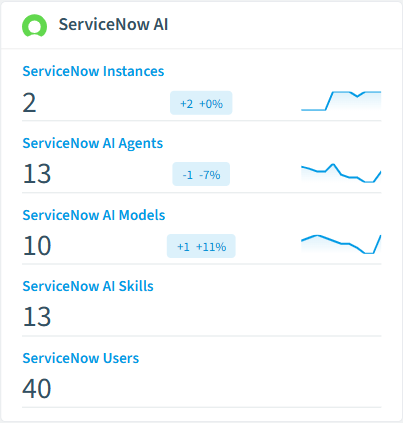
How ServiceNow governance works in Rencore
Rencore connects to ServiceNow via the ServiceNow API and inventories AI agents, users, roles, instance configurations, and usage data. Policies run on every scan cycle and evaluate each resource against governance rules, flagging agent risks, access issues, and operational problems.
The AI agent governance imperative
ServiceNow’s AI agents access sensitive ITSM data, HR records, and customer information. Without governance, agents accumulate permissions beyond their requirements, and configurations drift from security baselines. Rencore applies consistent AI agent governance across ServiceNow, Copilot Studio, and other agent platforms.
Who uses ServiceNow governance
CISOs use it to audit AI agent permissions and enforce data access controls. Heads of IT track instance health and license utilization. IT administrators enforce identity governance by linking ServiceNow users to Entra ID.
Getting started
Provide Rencore with ServiceNow API credentials. All 29 policies activate on first scan, covering AI agents, users, and instance configurations automatically.
Policies
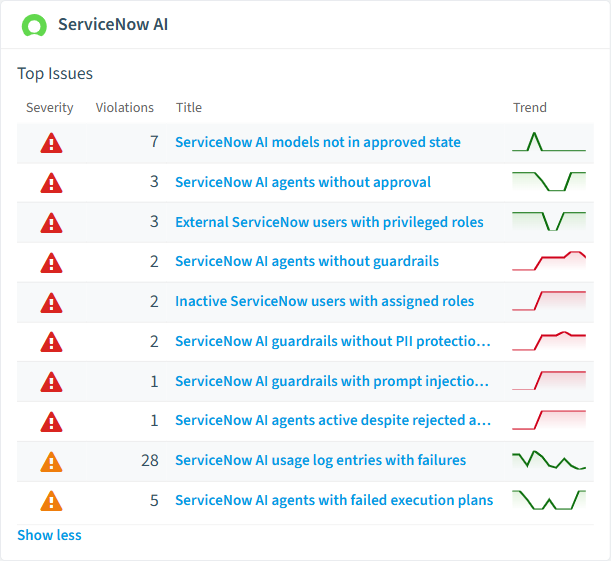
29 governance rules that detect violations and risks.
-
ServiceNow AI agents without approval
Detects active AI agents that have not been through an approval workflow
High Security -
ServiceNow AI agents without guardrails
Detects active AI agents that have no guardrail configuration attached
High Security -
ServiceNow AI models not in approved state
Detects active AI model configurations that have not been explicitly approved
High Security -
Inactive ServiceNow users with assigned roles
Detects deactivated users that still have role assignments
High Security -
External ServiceNow users with privileged roles
Detects external users who hold role assignments in ServiceNow
High External Access -
ServiceNow AI guardrails with prompt injection protection disabled
Detects active guardrail configurations where prompt injection protection is disabled
High Security
Need a rule that isn't listed? Rencore's Policy Builder lets you create custom policies tailored to your organization. Learn more about the Policy Builder
Reports
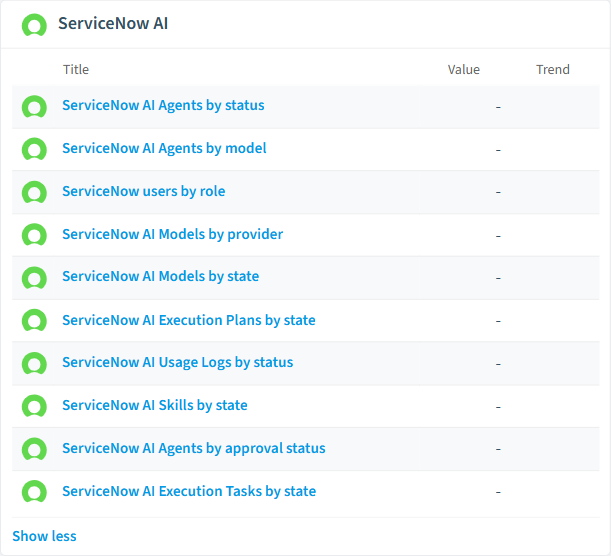
10 analytics views and dashboards.
-
ServiceNow AI Agents by status
Shows the number of AI agents grouped by their current status
Bar Chart · Operation
-
ServiceNow AI Agents by model
Shows which AI models are used by how many agents
Column Chart · Operation
-
ServiceNow users by role
Shows the top 10 most assigned roles and number of users per role
Bar Chart · Security
-
ServiceNow AI Models by provider
Shows the distribution of AI models across providers
Column Chart · Operation
-
ServiceNow AI Models by state
Shows the number of AI models grouped by their current state
Bar Chart · Operation
-
ServiceNow AI Execution Plans by state
Shows the distribution of execution plan outcomes
Bar Chart · Operation
Automations
6 automated remediation workflows.
-
Create ServiceNow Incident for Unapproved AI Agent
When an AI agent without approval is detected, create a ServiceNow incident so ITSM can track remediation.
-
Create ServiceNow Incident for AI Agent Without Guardrails
When an active AI agent is detected without guardrail configuration, create a ServiceNow incident for the security team.
-
Create ServiceNow Incident for Unapproved AI Model
When an active AI model is not in an approved state, create a ServiceNow incident to track governance review.
-
Create ServiceNow Incident for External User with Privileged Role
When an external ServiceNow user is found holding a role, create a ServiceNow incident for access review.
-
Create ServiceNow Incident for Disabled Injection Protection Guardrail
When a ServiceNow guardrail has injection protection disabled, create a ServiceNow incident for the security team.
-
Create ServiceNow Incident
Starting point for creating a ServiceNow incident from any automation. Pick the trigger and fill in the incident details.
Segments
15 data groupings for targeted filtering.
-
Active ServiceNow AI Agents
Shows AI agents that are currently active
-
ServiceNow AI Agents pending approval
Shows AI agents that are waiting for approval
-
External ServiceNow Users
Shows ServiceNow users who are external users
-
Inactive ServiceNow Users
Shows ServiceNow user accounts that are deactivated
-
Locked Out ServiceNow Users
Shows ServiceNow user accounts that are locked out
-
Deprecated ServiceNow AI Models
Shows AI models that are in deprecated state
-
Draft ServiceNow AI Agents
Shows AI agents that are currently in draft state
-
Published ServiceNow AI Skills
Shows AI skills that are currently published
-
Draft ServiceNow AI Skills
Shows AI skills that are currently in draft state
-
Failed ServiceNow AI Execution Plans
Shows AI execution plans that are in failed state
-
Active ServiceNow AI Guardrails
Shows guardrail configurations that are currently active
-
Inactive ServiceNow AI Guardrails
Shows guardrail configurations that have been deactivated
-
Active ServiceNow AI Use Cases
Shows AI use cases that are currently active
-
Failed ServiceNow AI Usage Logs
Shows AI usage log entries with failure or timeout status
-
Active ServiceNow AI Triggers
Shows AI trigger configurations that are currently active
Frequently asked questions
Does Rencore support governance for AI tools beyond Microsoft Copilot?
What is Rencore governance?
How do Rencore policies work?
Trusted by











