
Power BI

Rencore monitors Power BI across 10 governance policies, 5 reports, and 12 inventories, detecting workspace sprawl, overshared datasets, and stale content automatically.

Published For M365 Product Owner, IT Admin, CISO
Digital WorkplaceCode
Definition

Rencore Power BI governance is a set of 10 policies, 5 reports, 3 segments, and 12 inventories that continuously audit Power BI workspaces, datasets, reports, and sharing configurations. It detects workspaces shared beyond their intended audience, datasets with row-level security gaps, stale reports without recent views, and content published outside approved workspaces.

See Power BI in Rencore

Step 1 of 4

41 governance capabilities: 12 inventories · 10 policies · 5 reports · 3 segments · 2 provisioning templates

Why govern Power BI with Rencore

Control workspace sprawl

Detect workspaces without assigned admins, workspaces with no recent activity, and content published outside approved workspace structures. Prioritize cleanup by age and usage.

Secure dataset sharing

Identify datasets shared with external users, reports accessible to broader audiences than intended, and workspaces where sharing settings bypass organizational policies.

Manage content lifecycle

Find stale reports without views in 90+ days, datasets with broken data source connections, and dashboards that no longer reflect current business requirements. Reports show content usage trends.

What Rencore discovers

Rencore automatically inventories these Power BI object types.
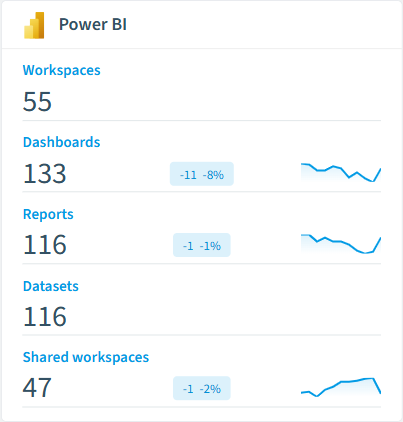
Workspace
Lists workspaces for PowerBI
Dashboard
Lists dashboards for PowerBI
Report
Lists reports for PowerBI
Datamart
Lists datamarts for PowerBI
Dataset
Lists datasets for PowerBI
Dataflow
Lists dataflows for PowerBI
Power BI inventory card in Rencore

How Power BI governance works in Rencore

Rencore connects to Power BI via the Power BI REST API and inventories workspaces, datasets, reports, dashboards, dataflows, and sharing configurations. Policies run on every scan cycle and flag sprawl, sharing, and lifecycle issues with severity levels.

Who uses Power BI governance

M365 product owners use it to maintain clean workspace governance alongside their broader M365 posture. IT administrators track workspace sprawl and manage content lifecycle. CISOs review dataset sharing policies to ensure sensitive business data stays within approved boundaries.

Getting started

Connect your Microsoft 365 tenant. Power BI policies activate on first scan alongside your existing M365 governance. No per-workspace configuration needed.

Policies

10 governance rules that detect violations and risks.
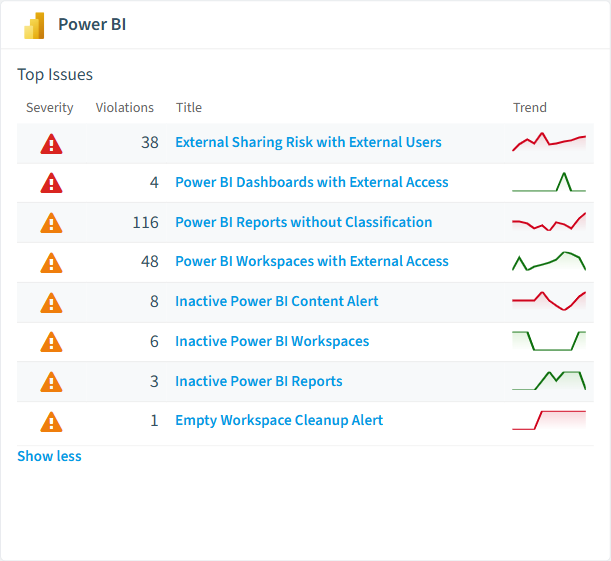
Power BI policies card in Rencore
External Sharing Risk with External Users
Identifies reports with external access permissions that may violate data protection policies
High Security
Power BI Dashboards with External Access
Identifies dashboards specifically shared externally which may contain aggregated sensitive information
High Security
Empty Workspace Cleanup Alert
Identifies unused workspace containers that should be removed to maintain environment cleanliness
Medium Sprawl
Inactive Power BI Content Alert
Identifies all unused content types for possible archiving or removal to improve environment efficiency
Medium Sprawl
Inactive Power BI Reports
Identifies specifically reports without recent activity for review and potential archiving
Medium Sprawl
Inactive Power BI Workspaces
Identifies workspaces without user activity that may be candidates for archiving or consolidation (30 days)
Medium Sprawl

Need a rule that isn't listed? Rencore's Policy Builder lets you create custom policies tailored to your organization.

Reports

5 analytics views and dashboards.
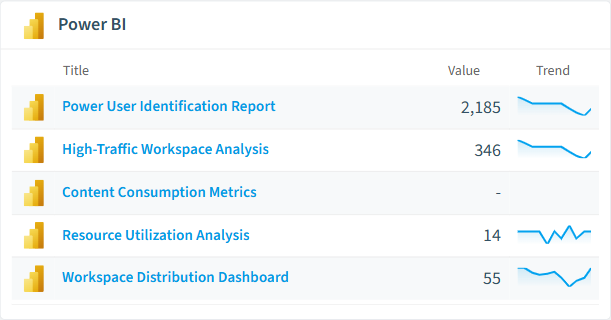
Content Consumption Metrics
Report on usage patterns across users to identify valuable content and potential training needs
Bar Chart · Adoption
High-Traffic Workspace Analysis
Identifies workspaces with highest activity levels, helping prioritize governance focus
Bar Chart · Adoption
Power User Identification Report
Identifies top Power BI users who could be champions or may need additional governance oversight
Bar Chart · Adoption
Resource Utilization Analysis
Comprehensive view of unused artifacts by type to support cleanup initiatives and resource optimization
Donut Chart · Sprawl
Workspace Distribution Dashboard
Visualizes all workspaces by type
Donut Chart · Adoption
Power BI reports card in Rencore

Segments

3 data groupings for targeted filtering.

Shared workspacesPersonal workspacesGroup workspaces

Provisioning templates

2 resource creation templates.

Request Power BI Data Gateway
Submit a Power BI data gateway request through a standardised approval process
Request Fabric Premium Capacity
Submit a Power BI Premium (Fabric Premium) capacity request through a standardised approval process

Frequently asked questions

What governance areas does Rencore cover?
Rencore covers six governance pillars: visibility and inventory across all Microsoft 365 services, ready-to-go policies with over 100 pre-built governance checks, compliance and audit evidence collection for regulatory requirements, extensibility and customization through custom policies and automations, cross-department collaboration with shared dashboards and role-based access, and AI and Copilot readiness to prepare tenants for secure AI adoption.
What is Rencore governance?
Rencore governance is a SaaS platform that continuously monitors your Microsoft 365 tenant for policy violations, configuration drift, and security risks across SharePoint, Teams, Power Platform, Copilot, and AI Agents. It automates compliance evidence collection, surfaces oversharing and sprawl, and provides actionable remediation workflows, reducing manual audit effort by up to 80%.
How do Rencore policies work?
Rencore ships with hundreds of pre-built policies that detect governance violations across every connector, oversharing, sprawl, cost overruns, security risks, and compliance gaps. Policies run on a continuous schedule, evaluate each discovered object against configurable rules, and flag violations with severity (High, Medium, Low), category, and a recommended action.

Related guides

Trusted by

MAPALBAMVille de LuxembourgWACKERGRUNDFOSAMGENOsramLufthansaThyssenKruppSunrisePattern







