 Rencore

Power BI
Rencore monitors Power BI across 10 governance policies, 5 reports, and 12 inventories, detecting workspace sprawl, overshared datasets, and stale content automatically.
Rencore Power BI governance is a set of 10 policies, 5 reports, 3 segments, and 12 inventories that continuously audit Power BI workspaces, datasets, reports, and sharing configurations. It detects workspaces shared beyond their intended audience, datasets with row-level security gaps, stale reports without recent views, and content published outside approved workspaces.
41 governance capabilities: 12 inventories · 10 policies · 5 reports · 3 segments · 2 provisioning templates
Why govern Power BI with Rencore
-
Control workspace sprawl
Detect workspaces without assigned admins, workspaces with no recent activity, and content published outside approved workspace structures. Prioritize cleanup by age and usage.
-
Secure dataset sharing
Identify datasets shared with external users, reports accessible to broader audiences than intended, and workspaces where sharing settings bypass organizational policies.
-
Manage content lifecycle
Find stale reports without views in 90+ days, datasets with broken data source connections, and dashboards that no longer reflect current business requirements. Reports show content usage trends.
What Rencore discovers
Rencore automatically inventories these Power BI object types.
-
Workspace
Lists workspaces for PowerBI
-
Dashboard
Lists dashboards for PowerBI
-
Report
Lists reports for PowerBI
-
Datamart
Lists datamarts for PowerBI
-
Dataset
Lists datasets for PowerBI
-
Dataflow
Lists dataflows for PowerBI
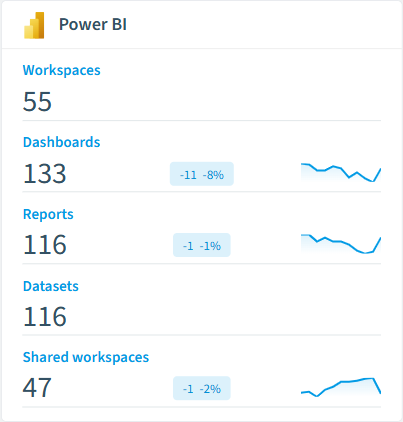
How Power BI governance works in Rencore
Rencore connects to Power BI via the Power BI REST API and inventories workspaces, datasets, reports, dashboards, dataflows, and sharing configurations. Policies run on every scan cycle and flag sprawl, sharing, and lifecycle issues with severity levels.
Who uses Power BI governance
M365 product owners use it to maintain clean workspace governance alongside their broader M365 posture. IT administrators track workspace sprawl and manage content lifecycle. CISOs review dataset sharing policies to ensure sensitive business data stays within approved boundaries.
Getting started
Connect your Microsoft 365 tenant. Power BI policies activate on first scan alongside your existing M365 governance. No per-workspace configuration needed.
Policies
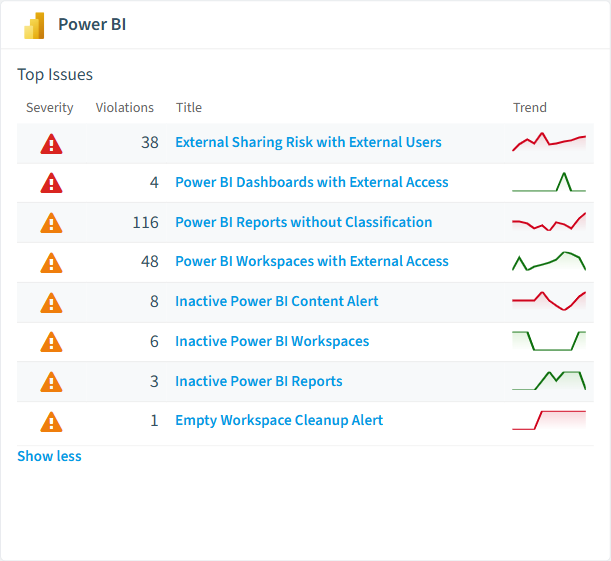
10 governance rules that detect violations and risks.
-
External Sharing Risk with External Users
Identifies reports with external access permissions that may violate data protection policies
High Security -
Power BI Dashboards with External Access
Identifies dashboards specifically shared externally which may contain aggregated sensitive information
High Security -
Empty Workspace Cleanup Alert
Identifies unused workspace containers that should be removed to maintain environment cleanliness
Medium Sprawl -
Inactive Power BI Content Alert
Identifies all unused content types for possible archiving or removal to improve environment efficiency
Medium Sprawl -
Inactive Power BI Reports
Identifies specifically reports without recent activity for review and potential archiving
Medium Sprawl -
Inactive Power BI Workspaces
Identifies workspaces without user activity that may be candidates for archiving or consolidation (30 days)
Medium Sprawl
Need a rule that isn't listed? Rencore's Policy Builder lets you create custom policies tailored to your organization. Learn more about the Policy Builder
Reports
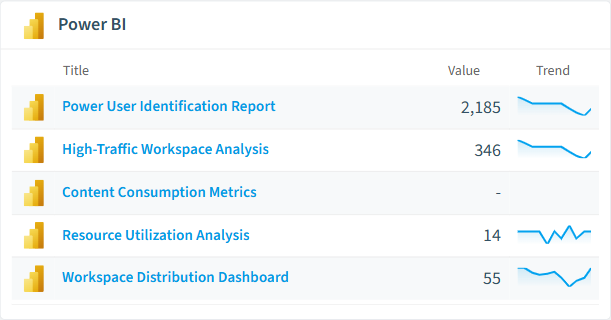
5 analytics views and dashboards.
-
Content Consumption Metrics
Report on usage patterns across users to identify valuable content and potential training needs
Bar Chart · Adoption
-
High-Traffic Workspace Analysis
Identifies workspaces with highest activity levels, helping prioritize governance focus
Bar Chart · Adoption
-
Power User Identification Report
Identifies top Power BI users who could be champions or may need additional governance oversight
Bar Chart · Adoption
-
Resource Utilization Analysis
Comprehensive view of unused artifacts by type to support cleanup initiatives and resource optimization
Donut Chart · Sprawl
-
Workspace Distribution Dashboard
Visualizes all workspaces by type
Donut Chart · Adoption
Segments
3 data groupings for targeted filtering.
-
Shared workspaces
Shows shared workspaces or simple workspaces used to share content with other users in the organization
-
Personal workspaces
Shows personal workspaces which are special type of workspace
-
Group workspaces
V1 version of shared workspace (will be deprecated after migration to latest version of shared workspace)
Provisioning Templates
2 resource creation templates.
-
Request Power BI Data Gateway
Submit a Power BI data gateway request through a standardised approval process
-
Request Fabric Premium Capacity
Submit a Power BI Premium (Fabric Premium) capacity request through a standardised approval process
Frequently asked questions
What governance areas does Rencore cover?
What is Rencore governance?
How do Rencore policies work?
Trusted by











