 Rencore

Palantir AIP
Rencore monitors Palantir AIP across 14 governance policies, 9 reports, and 17 inventories, detecting ontology risks, access issues, and resource sprawl automatically.
Palantir AIP is in private preview. Join the waiting list and we will reach out when access opens up.
Join the waiting listRencore Palantir AIP governance is a set of 14 policies, 9 reports, 11 segments, and 17 inventories that audit Palantir's Artificial Intelligence Platform for ontology governance, access control gaps, and resource management issues. It detects objects with excessive permissions, users without proper role assignments, and resources consuming capacity without recent activity.
51 governance capabilities: 17 inventories · 14 policies · 9 reports · 11 segments
Why govern Palantir AIP with Rencore
-
Govern ontology access
Detect objects and datasets with excessive permissions, access grants that bypass organizational policies, and ontology resources shared beyond their intended audience.
-
Control user access
Find users with excessive roles, accounts not linked to Entra ID, and external users without documented business justification. Enforce consistent identity governance.
-
Track resource utilization
Reports show resource usage trends, most active datasets, user activity patterns, and capacity consumption. Identify resources that need cleanup or access review.
What Rencore discovers
Rencore automatically inventories these Palantir AIP object types.
-
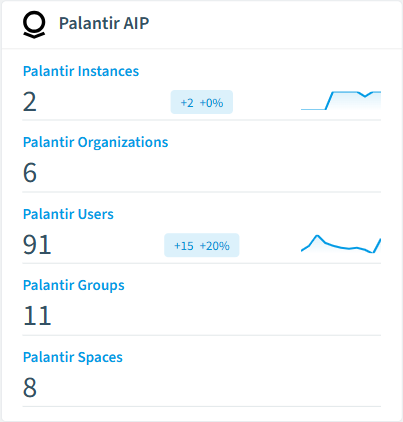
Palantir Instance
Individual deployment of the Palantir Foundry platform, representing a distinct environment with its own organizations, users, and resources.
-
Palantir Organization
A Palantir Foundry Organization representing a logical grouping of users and resources.
-
Palantir User
A User represents individual user or service account in Foundry.
-
Palantir Group
A Group in Palantir Foundry used for organizing users and managing permissions.
-
Palantir Space
A Space in Palantir Foundry representing a top-level container for Projects and resources.
-
Palantir Project
A Project in Palantir Foundry representing a container for related resources and workflows.
How Palantir AIP governance works in Rencore
Rencore connects to Palantir AIP via the Palantir API and inventories ontology objects, datasets, users, roles, and resources. Policies run on every scan cycle and evaluate each resource against governance rules, flagging access control, security, and operational issues.
Who uses Palantir AIP governance
CISOs use it to audit ontology access controls and enforce least-privilege principles. Heads of IT track resource utilization and identify capacity optimization opportunities. CIOs use the reports alongside other AI platform data for their enterprise AI governance view.
Getting started
Provide Rencore with Palantir API credentials. All 14 policies activate on first scan, covering ontology objects, users, roles, and resources automatically.
Policies
14 governance rules that detect violations and risks.
-
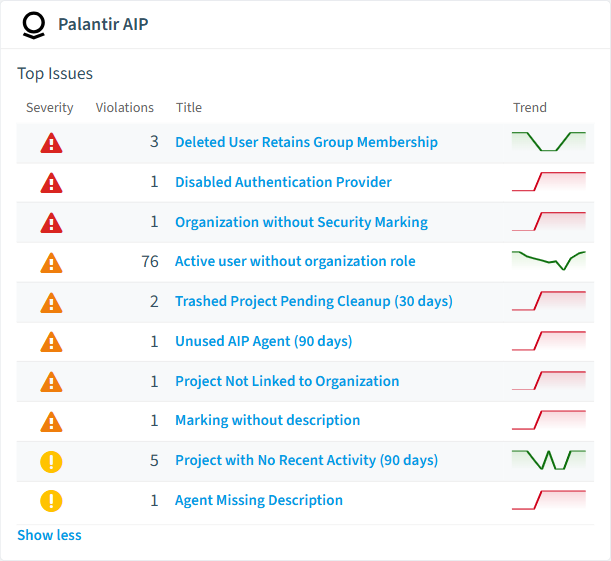
Disabled Authentication Provider
Identifies Palantir Foundry authentication providers that are disabled, which may block user login or indicate a configuration gap in the identity infrastructure
High Security -
Organization without Security Marking
Identifies Palantir organizations that have no security marking assigned, leaving data without an access classification boundary
High Security -
Deleted User Retains Group Membership
Flags deleted Palantir users who still hold group memberships, which can grant indirect access to markings, spaces, and resources
High User Offboarding -
Unused AIP Agent (90 days)
Flags Palantir AIP Agents with no user sessions in the last 90 days as candidates for cleanup to reduce environment sprawl
Medium Sprawl -
Trashed Project Pending Cleanup (30 days)
Identifies projects that have been in the trash for more than 30 days and are candidates for permanent deletion
Medium Sprawl -
Project Not Linked to Organization
Flags active Palantir projects that have no organizational association, leaving them outside any defined access control boundary
Medium Operation
Need a rule that isn't listed? Rencore's Policy Builder lets you create custom policies tailored to your organization. Learn more about the Policy Builder
Reports
9 analytics views and dashboards.
-
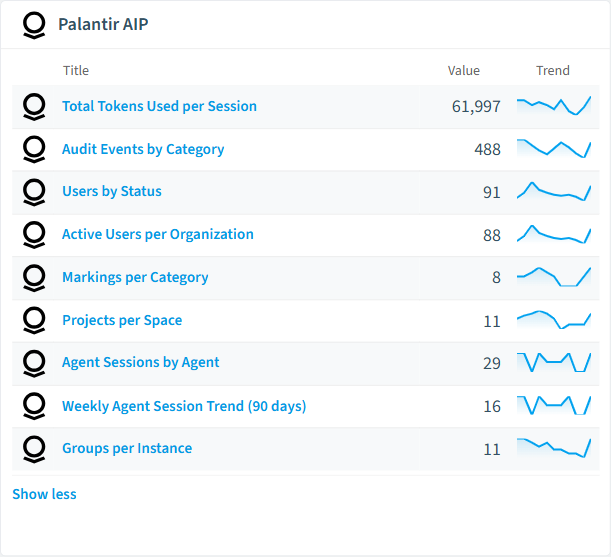
Users by Status
Distribution of Palantir Foundry users by account status (ACTIVE vs DELETED)
Donut Chart · Adoption
-
Projects per Space
Number of active projects in each Palantir Foundry space
Bar Chart · Adoption
-
Active Users per Organization
Number of active Palantir users per organization
Bar Chart · Adoption
-
Agent Sessions by Agent
Number of conversation sessions per Palantir AIP Agent, showing which agents are most actively used
Bar Chart · Adoption
-
Total Tokens Used per Session
Total LLM token consumption per agent session, identifying the most resource-intensive conversations
Bar Chart · Adoption
-
Weekly Agent Session Trend (90 days)
Weekly count of Palantir AIP Agent conversations over the last 90 days to track adoption and usage trends
Column Chart · Adoption
Segments
11 data groupings for targeted filtering.
-
Deleted Palantir Users
All user accounts in Palantir Foundry with a DELETED status
-
Active Users without Group Membership
Active Palantir users who are not a member of any group
-
All AIP Agents
All AI agents created in Palantir AIP Agent Studio
-
Disabled Authentication Providers
SSO authentication providers configured in Palantir Foundry that are currently disabled
-
Trashed Projects
Palantir Foundry projects that have been directly moved to the trash
-
Recently Created Projects (30 days)
Palantir Foundry projects created within the last 30 days
-
Mandatory Marking Categories
Palantir Foundry marking categories that enforce mandatory access control (all markings must be satisfied)
-
CBAC Marking Categories
Palantir Foundry marking categories using capability-based access control (any marking satisfies access)
-
Spaces without Projects
Palantir Foundry spaces that do not contain any projects
-
Active Palantir Users
All user accounts in Palantir Foundry with an ACTIVE status
-
Failed Audit Events
Palantir Foundry audit events where the action resulted in a failure
Frequently asked questions
Does Rencore support governance for AI tools beyond Microsoft Copilot?
What is Rencore governance?
How do Rencore policies work?
Trusted by











