
OneDrive
Rencore monitors OneDrive across 34 governance policies, 8 reports, and 4 inventories, detecting storage quota risks, anonymous and external sharing exposure, dormant sites, and stale files automatically.
Rencore OneDrive governance is a set of 34 policies, 8 reports, 10 segments, and 4 inventories that audit OneDrive for Business across storage quotas, sharing posture, and lifecycle. It detects OneDrives over 75 percent of quota, anonymous links with edit permission, external shares without expiration, dormant accounts, and OneDrive files older than 5 years, supplying IT with the data needed to reclaim storage and reduce Copilot data-exposure risk.
See OneDrive in Rencore
Every OneDrive object Rencore discovers and inventories across your tenant.
The governance policies Rencore evaluates against OneDrive, with severity and category.
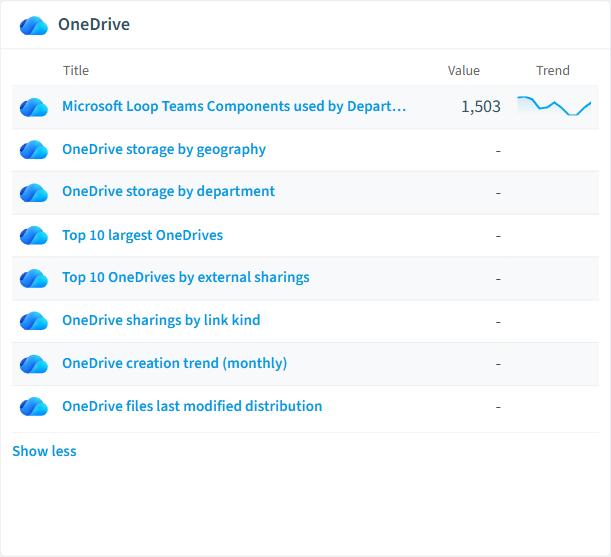
Built-in OneDrive reports and analytics views in Rencore.
The OneDrive governance dashboard, summarizing risks and status at a glance.
Why govern OneDrive with Rencore
Manage storage and quotas
Flag OneDrives over 1 TB, OneDrives past 75 percent of quota, OneDrives in nearing or exceeded state, and accounts holding more than 100,000 documents or 10 GB in recycle bin. Plan quota increases or archival before users hit hard limits.
Close anonymous and external sharing gaps
Detect anonymous links with edit permission, org-wide sharing links, external users with direct (non-link) access, external shares without expiration, and shares created by disabled accounts. Reduce Copilot oversharing risk at the source.
Clean up inactive accounts and stale files
Find OneDrives belonging to disabled users, dormant OneDrives unchanged in 12 or 24 months, orphaned OneDrives with more than 1,000 documents, and files older than 1, 2, or 5 years. Reclaim storage and tidy up the index Copilot reasons over.
Track sharing and storage trends
8 reports cover OneDrive storage by geography and department, top 10 largest OneDrives, top 10 by external sharings, link-kind distribution, monthly creation trend, and last-modified distribution.
What Rencore discovers
Rencore automatically inventories these OneDrive object types.
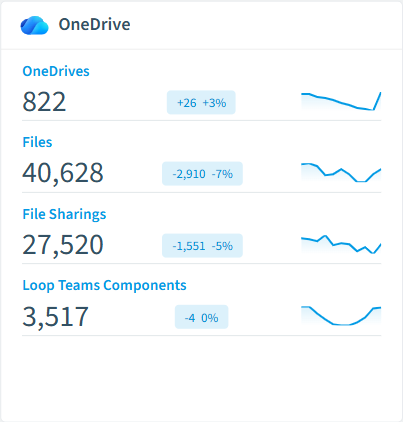
How OneDrive governance works in Rencore
Rencore connects to OneDrive for Business via the Microsoft Graph API and inventories four object types: OneDrives, files, folders, and file sharings. The 34 policies run on every scan cycle, evaluating each OneDrive and shared item against quota, sharing, and lifecycle rules with severity levels.
Who uses OneDrive governance
M365 product owners use storage and quota policies to plan tenant-level capacity. IT administrators rely on the 10 reusable segments (dormant OneDrives, large OneDrives, expired-but-active shares, externally shared files) to drive cleanup campaigns. CISOs use the anonymous-link and external-access policies as part of Copilot data readiness, since every overshared file is a candidate for Copilot retrieval.
Getting started
Connect your Microsoft 365 tenant. All 34 OneDrive policies activate on first scan alongside your existing M365 governance, with no additional configuration needed. Reports cover storage by geography, by department, and by sharing posture so you can see exposure at a glance.
Policies
34 governance rules that detect violations and risks.
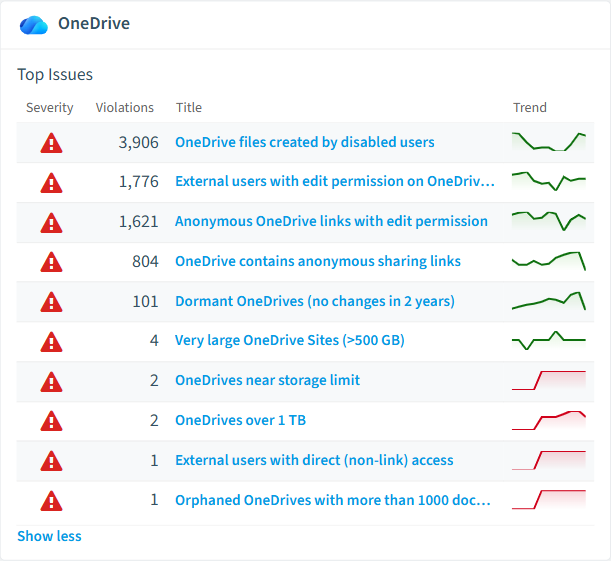
Need a rule that isn't listed? Rencore's Policy Builder lets you create custom policies tailored to your organization.
Reports
8 analytics views and dashboards.
Automations
3 automated remediation workflows.
Segments
10 data groupings for targeted filtering.
Frequently asked questions
What governance areas does Rencore cover?
What is Rencore governance?
How do Rencore policies work?
Related guides
Trusted by










