 Rencore

Microsoft 365
Rencore monitors Microsoft 365 Groups across 29 governance policies, 24 reports, and 11 inventories, detecting group sprawl, stale memberships, and lifecycle issues automatically.
Rencore Microsoft 365 Groups governance is a set of 29 policies, 24 reports, 10 segments, and 11 inventories that continuously audit M365 groups, users, and memberships. It detects groups without owners, groups with excessive guest membership, inactive groups consuming resources, and naming convention violations, providing the core governance layer that underpins Teams, SharePoint, and Planner workloads.
105 governance capabilities: 11 inventories · 29 policies · 24 reports · 10 segments · 3 automations · 3 provisioning templates
Why govern Microsoft 365 with Rencore
-
Control group sprawl
Detect groups without owners, groups with no recent activity, and groups created outside approved processes. 29 policies cover every aspect of the group lifecycle from creation to archival.
-
Manage membership and guests
Find groups with excessive guest members, members who left the organization but retain group access, and distribution lists with stale membership that should be converted or removed.
-
Enforce naming and classification
Flag groups violating naming conventions, groups missing required sensitivity labels, and groups without proper classification metadata for compliance requirements.
-
Foundation for M365 governance
Microsoft 365 Groups underpin Teams, SharePoint sites, Planner plans, and shared mailboxes. Group governance is the foundation that all other M365 governance builds on.
What Rencore discovers
Rencore automatically inventories these Microsoft 365 object types.
-
User
All users registered in your tenant (internal, external)
-
Group
All Entra ID groups in your Tenant (Security groups, Microsoft 365 groups)
-
Sensitivity Label
All sensitivity labels configured in your tenant
-
Subscription
All subscriptions with their licenses available in your tenant
-
Service Assignment
Details when a service or app has been assigned to the user
-
Message Center Message
All messages from the Microsoft 365 Message Center
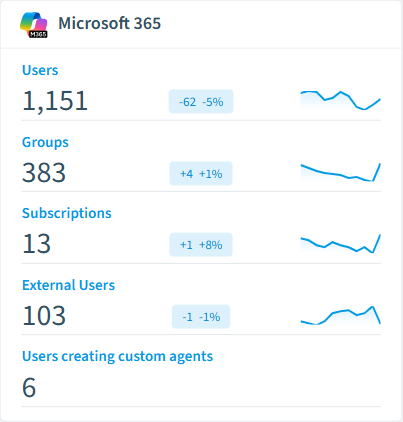
How Microsoft 365 Groups governance works in Rencore
Rencore connects to Microsoft 365 via Microsoft Graph API and inventories all groups, users, memberships, guest accounts, and group metadata. This is Rencore’s core service connector that provides the identity and group foundation for all other M365 governance policies. 29 policies run on every scan cycle covering sprawl, access, naming, and lifecycle.
The group governance foundation
Every Teams workspace, SharePoint team site, Planner plan, and shared mailbox is backed by a Microsoft 365 Group. Governing groups is governing your entire M365 collaboration layer. Without group governance, sprawl in Teams, SharePoint, and Planner is undetectable.
Who uses Microsoft 365 Groups governance
M365 product owners use it as their primary governance dashboard for the entire tenant. IT administrators track group lifecycle and enforce naming standards. CISOs monitor guest membership and external access patterns across all M365 workloads.
Getting started
Connect your Microsoft 365 tenant. Groups governance activates automatically as the core Rencore connector. All 29 policies run on first scan with no additional configuration.
Policies
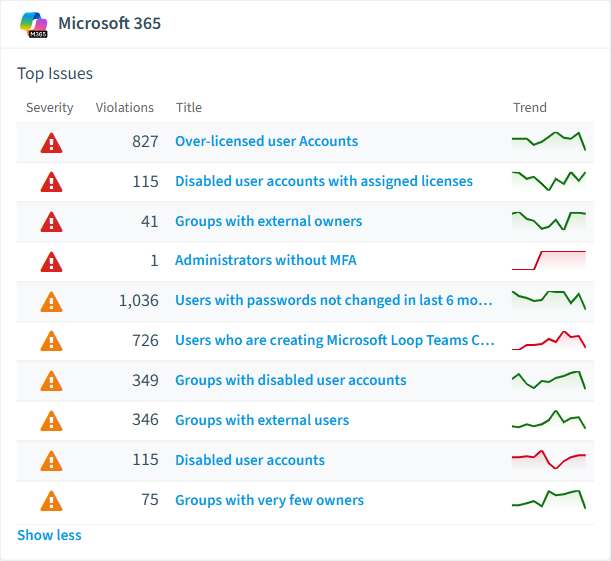
29 governance rules that detect violations and risks.
-
Groups with external owners
Shows groups that have external users as owners
High Security -
Disabled user accounts with assigned licenses
Shows disabled user accounts which have any licenses assigned
High Costs -
Global administrators without MFA
Shows global administrators that have not activated multi factor authentication
High Security -
Administrators without MFA
Shows administrators that have not activated multi factor authentication
High Security -
Over-licensed user Accounts
User accounts that have more than one License assigned with overlapping apps.
High Costs -
Disabled user accounts
Shows all disabled user accounts
Medium User Offboarding
Need a rule that isn't listed? Rencore's Policy Builder lets you create custom policies tailored to your organization. Learn more about the Policy Builder
Reports
24 analytics views and dashboards.
-
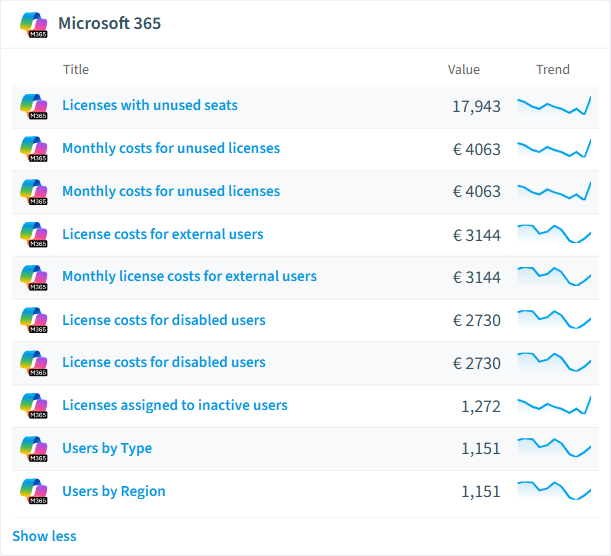
Monthly costs for unused licenses
Shows licenses which have unused seats
Bar Chart · Costs
-
License costs for disabled users
License costs for disabled users
Bar Chart · Costs
-
License costs for external users
License costs for external users
Bar Chart · Costs
-
Monthly costs for unused licenses
Shows licenses which have unused seats
Bar Chart · Costs
-
License costs for disabled users
License costs for disabled users
Bar Chart · Costs
-
Monthly license costs for external users
Monthly license costs for external users
Bar Chart · Costs
Automations
3 automated remediation workflows.
-
Disable inactive external user accounts
Automatically disables external user accounts for users that have not signed in for more than 6 month
-
Notify users using Microsoft Loop Teams components about the technical implications
With this automation, users who create Microsoft Loop components will receive an email informing them about where the components are stored and what happens if someone deletes them.
-
Create ServiceNow Incident
Create a ServiceNow incident when an M365 Groups policy violation is detected. Requires a ServiceNow connection.
Segments
10 data groupings for targeted filtering.
-
Internal Users
Shows all internal users
-
External Users
Shows all external users
-
Disabled Accounts
Shows all disabled users
-
Suspended/Disabled Subscriptions
All subscriptions that are not enabled
-
Distribution Groups
All active distribution groups
-
Groups with Teams
All groups with Teams connected
-
Microsoft 365 Groups
All active Microsoft 365 groups
-
Private Groups
All private groups
-
Public Groups
All public groups
-
Security Groups
All active security groups
Provisioning Templates
3 resource creation templates.
-
Private M365 Group
Template for a private M365 group
-
Guest user invitation with approval
Invite an external person into the tenant. The manager approves first, then the guest receives a one-time link to accept terms. Only after both approvals does the guest identity get provisioned in Entra.
-
Guest user invitation without approval
Invite an external person directly, without manager approval. The guest still accepts terms via a one-time link before the identity is provisioned in Entra.
Frequently asked questions
What governance areas does Rencore cover?
What is Rencore governance?
How do Rencore policies work?
Trusted by











