 Rencore

Intune
Rencore monitors Microsoft Intune across 19 governance policies, 24 reports, and 17 inventories, detecting non-compliant devices, stale configurations, and policy drift automatically.
Rencore Intune governance is a set of 19 policies, 24 reports, 34 segments, and 17 inventories that continuously audit Microsoft Intune for device compliance gaps, configuration drift, and app management issues. It detects devices out of compliance, configuration profiles not applied successfully, stale app deployments, and conditional access policies with gaps in coverage.
105 governance capabilities: 17 inventories · 19 policies · 24 reports · 34 segments · 5 automations
Why govern Intune with Rencore
-
Enforce device compliance
Detect devices that fail compliance policies, devices without encryption enabled, and managed devices that haven't checked in within policy. Segment findings by OS, department, and risk level.
-
Detect configuration drift
Identify configuration profiles that failed to apply, policies with conflicting settings, and conditional access rules with coverage gaps. Reports show compliance trends over time.
-
Manage app lifecycle
Find app deployments that failed installation, apps assigned to groups without active members, and outdated app versions still deployed across the device fleet.
-
Report on device estate
24 reports cover device inventory, compliance status, app installation status, and configuration profile assignment. Segment the device estate by OS, enrollment type, and ownership.
What Rencore discovers
Rencore automatically inventories these Intune object types.
-
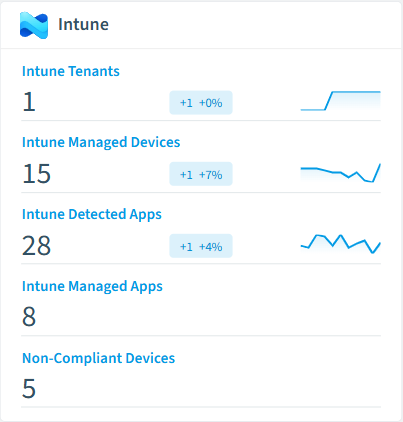
Intune Tenant
Microsoft Intune tenant environment for endpoint device management and governance
-
Intune Managed Device
Devices enrolled and managed through Microsoft Intune, including compliance status and hardware details
-
Intune Detected App
Applications detected on Intune-managed devices, including shadow AI tools and unapproved software
-
Intune Managed App
Applications deployed and managed through Microsoft Intune, including LOB apps, store apps, and web links
-
Intune App Protection Policy
Mobile Application Management (MAM) policies that protect corporate data within managed applications
-
Intune Compliance Policy
Device compliance policies that define the rules and settings devices must meet to be considered compliant
How Intune governance works in Rencore
Rencore connects to Microsoft Intune via Microsoft Graph API and inventories devices, compliance policies, configuration profiles, apps, and conditional access rules. Policies run on every scan cycle and flag compliance failures, configuration drift, and app management issues with severity levels.
Who uses Intune governance
IT administrators use it to maintain compliance across the managed device fleet and detect configuration drift. CISOs rely on device compliance policies to ensure encryption, patch levels, and conditional access rules meet security requirements. M365 product owners use the reports to track endpoint governance alongside their broader M365 governance posture.
Getting started
Connect your Microsoft 365 tenant. Intune policies activate on first scan alongside your existing M365 governance. No additional agent installation required beyond standard Microsoft Graph permissions.
Policies
19 governance rules that detect violations and risks.
-
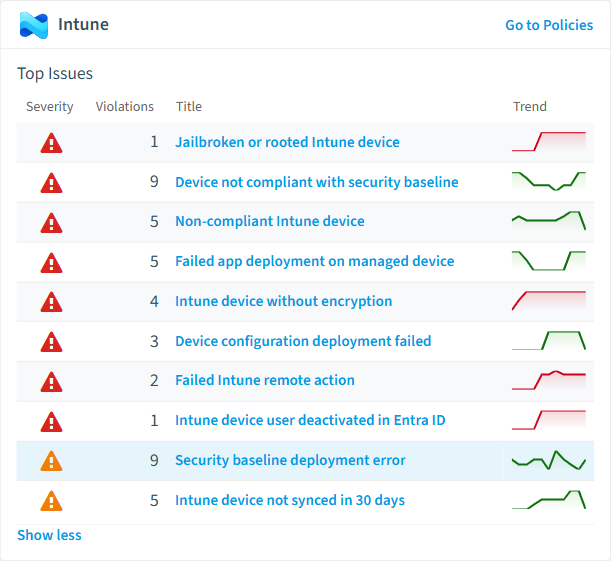
Non-compliant Intune device
Detects devices that are in a noncompliant compliance state
High Security -
Intune device without encryption
Detects devices that do not have storage encryption enabled
High Security -
Intune device user deactivated in Entra ID
Detects Intune devices whose primary user is deactivated in Entra ID
High Security -
Failed app deployment on managed device
Detects managed applications that failed to install on devices
High Operation -
Device configuration deployment failed
Detects devices where configuration profile deployment resulted in error or conflict
High Security -
Device not compliant with security baseline
Detects devices that do not meet security baseline requirements
High Security
Need a rule that isn't listed? Rencore's Policy Builder lets you create custom policies tailored to your organization. Learn more about the Policy Builder
Reports
24 analytics views and dashboards.
-
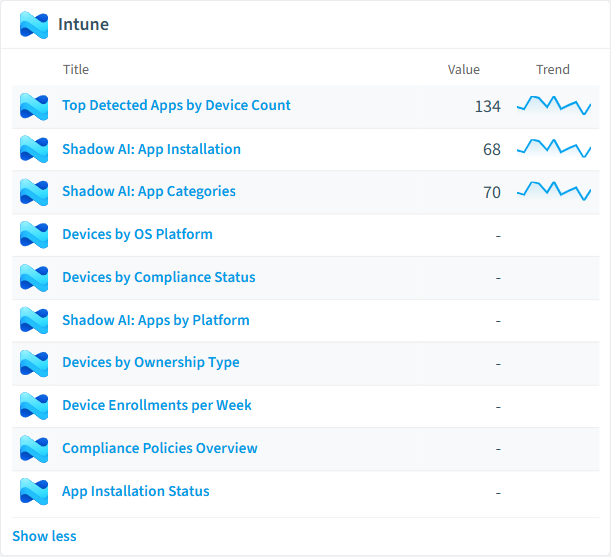
Devices by OS Platform
Shows the distribution of managed devices by operating system
Donut Chart · Operation
-
Devices by Compliance Status
Shows the distribution of managed devices by compliance state
Donut Chart · Security
-
Top Detected Apps by Device Count
Shows the top detected applications ranked by number of devices
Bar Chart · Operation
-
Shadow AI: App Installation
Shows AI desktop applications and the number of devices they are installed on
Bar Chart · Security
-
Shadow AI: Apps by Platform
Shows the distribution of AI applications by operating system platform
Donut Chart · Security
-
Shadow AI: App Categories
Shows AI application device exposure grouped by category (Chatbot, Code Assistant, Image Generation, etc.)
Donut Chart · Security
Automations
5 automated remediation workflows.
-
Sync Intune Device
Triggers a device sync for an Intune managed device on policy violation
-
Retire Intune Device
Retires an Intune managed device on policy violation
-
Wipe Intune Device
Wipes an Intune managed device on policy violation
-
Lock Intune Device
Locks an Intune managed device on non-compliance
-
Reset Passcode Intune Device
Resets passcode on an Intune managed device on policy violation
Segments
34 data groupings for targeted filtering.
-
Compliant Devices
Shows devices with a compliant compliance state
-
Non-Compliant Devices
Shows devices with a noncompliant compliance state
-
Windows Devices
Shows devices running Windows
-
macOS Devices
Shows devices running macOS
-
iOS Devices
Shows devices running iOS
-
Android Devices
Shows devices running Android
-
Corporate Devices
Shows corporate-owned devices
-
Personal Devices
Shows personally-owned devices
-
Shadow AI: All AI Apps
Shows all detected AI desktop applications across managed devices
-
Shadow AI: Chatbots
Shows AI chatbot applications (ChatGPT, Claude, Gemini, etc.)
-
Shadow AI: Code Assistants
Shows AI code assistant applications (GitHub Copilot, Cursor, Windsurf, etc.)
-
Shadow AI: Image Generation
Shows AI image generation applications (Midjourney, Stable Diffusion, Adobe Firefly, etc.)
-
Shadow AI: Local AI
Shows locally-running AI applications (Ollama, LM Studio, GPT4All, etc.)
-
Stale Devices
Shows devices that have not synced with Intune in the last 30 days
-
Failed App Installations
Shows app installation records with a failed state
-
Failed Config Deployments
Shows device configuration deployments with error or conflict state
-
Baseline Compliant Devices
Shows devices that are compliant with security baselines
-
Baseline Non-Compliant Devices
Shows devices that do not meet security baseline requirements
-
Certificate Profiles
Shows configuration profiles for certificate deployment
-
VPN Profiles
Shows configuration profiles for VPN deployments
-
Assigned App Protection Policies
Shows app protection policies that are assigned to users or devices
-
Recently Enrolled Devices
Shows devices enrolled in the last 30 days
-
Aging Devices (3+ Years)
Shows devices enrolled more than 3 years ago
-
Unencrypted Devices
Shows devices without storage encryption enabled
-
Encrypted Devices
Shows devices with storage encryption enabled
-
Windows Update Profiles
Shows configuration profiles for Windows Update for Business
-
MDM Enrolled Devices
Shows devices enrolled via MDM management agent
-
EAS+MDM Enrolled Devices
Shows devices enrolled via Exchange ActiveSync and MDM
-
Enabled CA Policies
Shows conditional access policies that are actively enforced
-
Disabled CA Policies
Shows conditional access policies that are disabled
-
Report-Only CA Policies
Shows conditional access policies in report-only mode
-
Failed Remote Actions
Shows audit events where the remote action failed
-
Device Wipe Events
Shows audit events for device wipe actions
-
Device Lock Events
Shows audit events for device lock actions
Frequently asked questions
What governance areas does Rencore cover?
What is Rencore governance?
How do Rencore policies work?
Trusted by











