
Google Workspace
Rencore monitors Google Workspace across 28 governance policies, 12 reports, and 11 inventories, detecting Drive oversharing, group sprawl, and stale accounts automatically.
Google Workspace is in private preview. Join the waiting list and we will reach out when access opens up.
Join the waiting listRencore Google Workspace governance is a set of 28 policies, 12 reports, 13 segments, and 11 inventories that continuously audit Google Drive, Docs, Sheets, Sites, Groups, and Chat. It detects files shared publicly via Drive links, groups with external members beyond policy, admin roles assigned without documented justification, and users deactivated in Entra ID who retain Google Workspace access.
See Google Workspace in Rencore
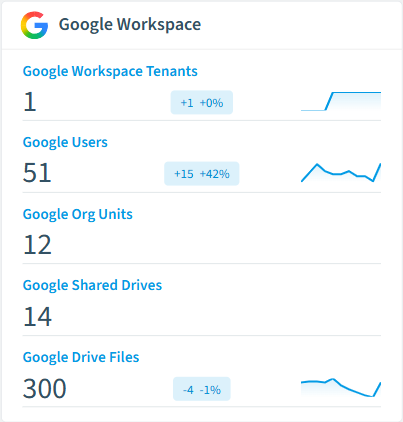
Every Google Workspace object Rencore discovers and inventories across your tenant.
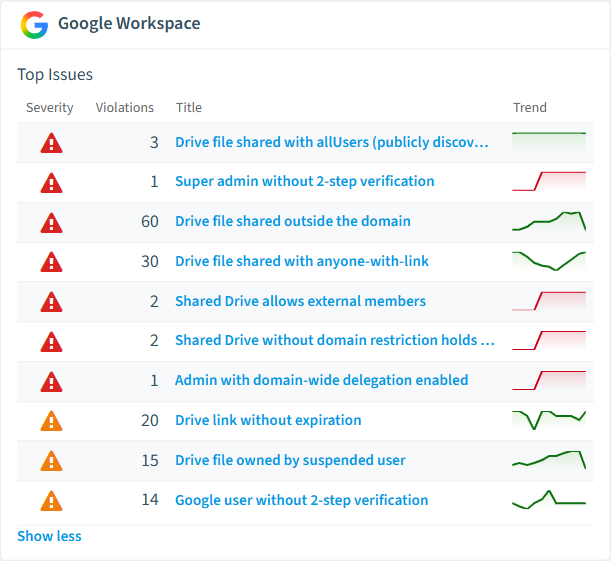
The governance policies Rencore evaluates against Google Workspace, with severity and category.
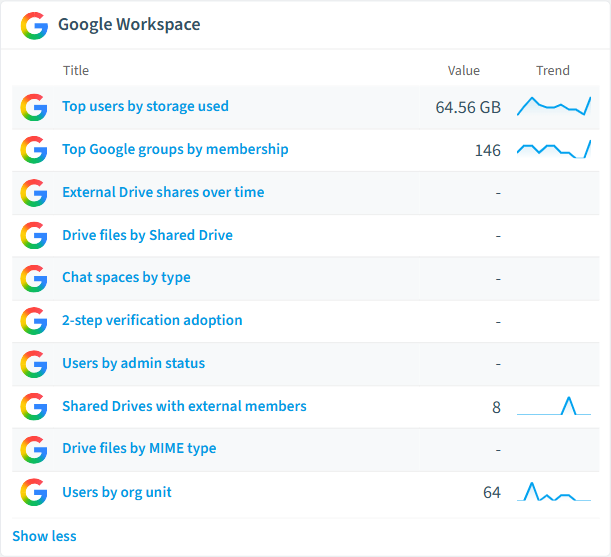
Built-in Google Workspace reports and analytics views in Rencore.
The Google Workspace governance dashboard, summarizing risks and status at a glance.
Why govern Google Workspace with Rencore
Control Drive sharing
Detect files shared publicly via link, documents accessible to anyone with the URL, and sharing patterns that bypass organizational data protection policies. Prioritize findings by file sensitivity.
Manage groups and membership
Find groups with external members, groups without assigned owners, and chat spaces with stale membership. Reports show group activity trends and membership patterns.
Enforce user lifecycle
Identify users deactivated in Entra ID who still have active Google Workspace access, admin roles assigned beyond policy, and accounts without recent sign-in activity.
Unify cross-platform governance
Organizations using Google Workspace alongside Microsoft 365 get a single governance view. Rencore links Google users to M365 identities by email for consistent cross-platform oversight.
What Rencore discovers
Rencore automatically inventories these Google Workspace object types.
How Google Workspace governance works in Rencore
Rencore connects to Google Workspace via Google Admin and Drive APIs, inventorying files, folders, sharing links, users, groups, admin roles, and chat spaces. It links Google users to M365 users by email for cross-platform identity governance. Policies run on every scan cycle and flag sharing, access, and lifecycle violations.
Who uses Google Workspace governance
IT administrators use it to maintain clean Drive sharing hygiene and manage group lifecycle. CISOs rely on external sharing policies to detect data exposure risks across Google and Microsoft platforms. Heads of IT use reports to compare governance posture between Google Workspace and Microsoft 365.
Getting started
Provide Rencore with Google Workspace Admin API credentials. All 28 policies activate on first scan, covering Drive, Groups, Chat, and user accounts. Rencore links Google users to Entra ID automatically.
Policies
28 governance rules that detect violations and risks.
Need a rule that isn't listed? Rencore's Policy Builder lets you create custom policies tailored to your organization.
Reports
12 analytics views and dashboards.
Automations
5 automated remediation workflows.
Segments
13 data groupings for targeted filtering.
Frequently asked questions
What governance areas does Rencore cover?
What is Rencore governance?
How do Rencore policies work?
Related guides
Trusted by










