
Glean
Rencore monitors Glean across 26 governance policies, 7 reports, and 14 inventories, detecting data source risks, access issues, and adoption gaps automatically.
Glean is in private preview. Join the waiting list and we will reach out when access opens up.
Join the waiting listRencore Glean governance is a set of 26 policies, 7 reports, 10 segments, and 14 inventories that audit Glean's enterprise search and AI assistant for data source governance, access control gaps, and adoption issues. It detects data sources connected without proper review, users with excessive permissions, inactive accounts consuming licenses, and search patterns indicating sensitive data exposure.
See Glean in Rencore
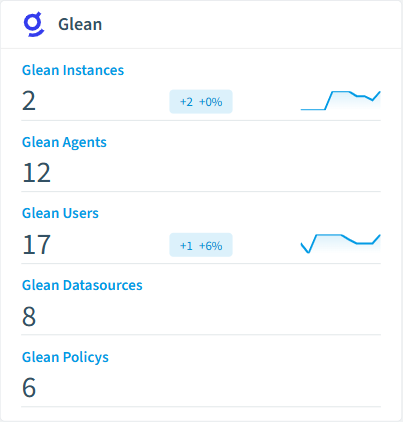
Every Glean object Rencore discovers and inventories across your tenant.
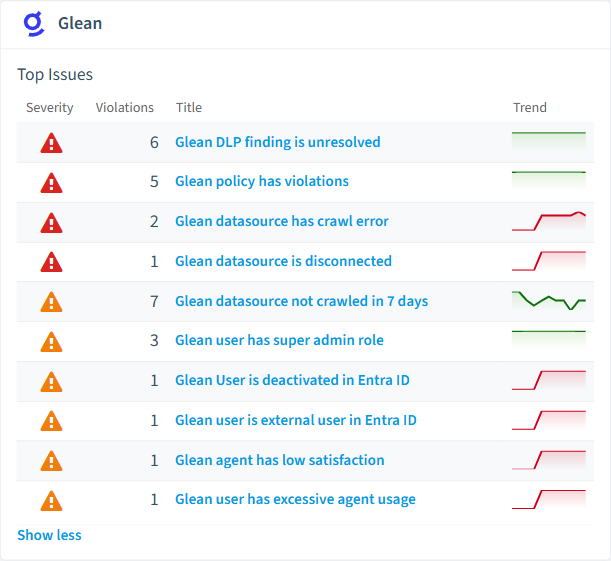
The governance policies Rencore evaluates against Glean, with severity and category.
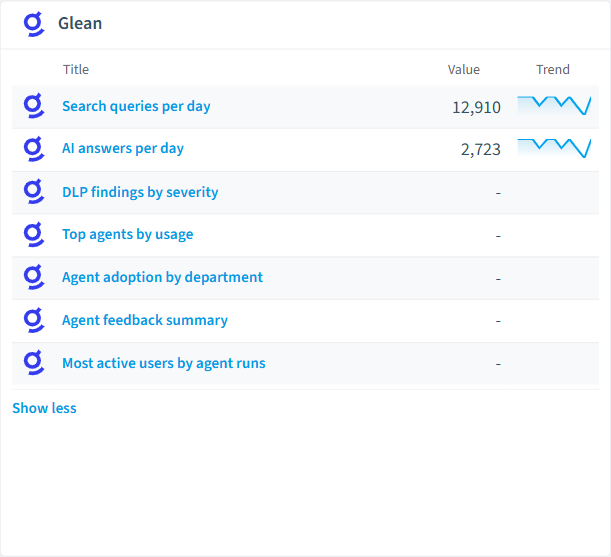
Built-in Glean reports and analytics views in Rencore.
The Glean governance dashboard, summarizing risks and status at a glance.
Why govern Glean with Rencore
Govern connected data sources
Detect data sources connected to Glean without security review, connectors pulling from sensitive repositories, and data sources with stale synchronization. Each finding includes severity and recommended action.
Control user access
Find users with excessive permissions, accounts deactivated in Entra ID still active in Glean, and external users accessing enterprise search results without authorization.
Track adoption and search patterns
Reports show search query trends, most-used data sources, user activity patterns, and adoption rates by department. Identify teams that need onboarding support.
What Rencore discovers
Rencore automatically inventories these Glean object types.
How Glean governance works in Rencore
Rencore connects to Glean via the Glean API and inventories data sources, connectors, users, permissions, and search configurations. Policies run on every scan cycle and flag data governance, access control, and adoption issues with severity levels and recommended actions.
Who uses Glean governance
CISOs use it to audit which data sources feed Glean’s enterprise search and AI assistant. Heads of IT track adoption and justify the Glean investment with usage data. CIOs compare Glean usage patterns with other AI tools to inform their enterprise AI strategy.
Getting started
Provide Rencore with Glean API credentials. All 26 policies activate on first scan, covering data sources, users, and connectors. No per-connector configuration required.
Policies
26 governance rules that detect violations and risks.
Need a rule that isn't listed? Rencore's Policy Builder lets you create custom policies tailored to your organization.
Reports
7 analytics views and dashboards.
Automations
2 automated remediation workflows.
Segments
10 data groupings for targeted filtering.
Frequently asked questions
Does Rencore support governance for AI tools beyond Microsoft Copilot?
What is Rencore governance?
How do Rencore policies work?
Related guides
Related reading
- AWS BedrockRencore monitors AWS Bedrock across 30 governance policies, 15 reports, and 19 inventories, detecting model access risks, cost overruns, and usage anomalies automatically.
- Microsoft FoundryRencore inventories Azure AI Foundry with 6 inventory types covering projects, hubs, model deployments, and connections for full AI platform visibility.
- Anthropic ClaudeRencore monitors Anthropic Claude across 26 governance policies, 14 reports, and 11 inventories, covering costs, security, adoption, and data protection for your Claude organization.
Trusted by










