 Rencore

Glean
Rencore monitors Glean across 23 governance policies, 7 reports, and 14 inventories, detecting data source risks, access issues, and adoption gaps automatically.
Glean is in private preview. Join the waiting list and we will reach out when access opens up.
Join the waiting listRencore Glean governance is a set of 23 policies, 7 reports, 10 segments, and 14 inventories that audit Glean's enterprise search and AI assistant for data source governance, access control gaps, and adoption issues. It detects data sources connected without proper review, users with excessive permissions, inactive accounts consuming licenses, and search patterns indicating sensitive data exposure.
61 governance capabilities: 14 inventories · 23 policies · 7 reports · 10 segments · 2 automations
Why govern Glean with Rencore
-
Govern connected data sources
Detect data sources connected to Glean without security review, connectors pulling from sensitive repositories, and data sources with stale synchronization. Each finding includes severity and recommended action.
-
Control user access
Find users with excessive permissions, accounts deactivated in Entra ID still active in Glean, and external users accessing enterprise search results without authorization.
-
Track adoption and search patterns
Reports show search query trends, most-used data sources, user activity patterns, and adoption rates by department. Identify teams that need onboarding support.
What Rencore discovers
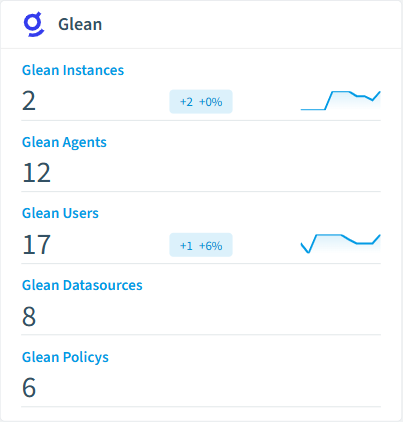
Rencore automatically inventories these Glean object types.
-
Glean Instance
Individual deployments of the Glean enterprise AI platform, each serving as a separate working environment
-
Glean Agent
AI agents configured in Glean that can execute workflows and complete tasks using natural language
-
Glean User
Users with access to the Glean enterprise AI platform
-
Glean Datasource
Data sources connected to the Glean platform for enterprise search and AI capabilities
-
Glean Policy
Data governance policies configured in Glean for compliance and content control
-
Glean DLP Finding
Data Loss Prevention findings detected by Glean governance scanning
How Glean governance works in Rencore
Rencore connects to Glean via the Glean API and inventories data sources, connectors, users, permissions, and search configurations. Policies run on every scan cycle and flag data governance, access control, and adoption issues with severity levels and recommended actions.
Who uses Glean governance
CISOs use it to audit which data sources feed Glean’s enterprise search and AI assistant. Heads of IT track adoption and justify the Glean investment with usage data. CIOs compare Glean usage patterns with other AI tools to inform their enterprise AI strategy.
Getting started
Provide Rencore with Glean API credentials. All 23 policies activate on first scan, covering data sources, users, and connectors. No per-connector configuration required.
Policies
23 governance rules that detect violations and risks.
-
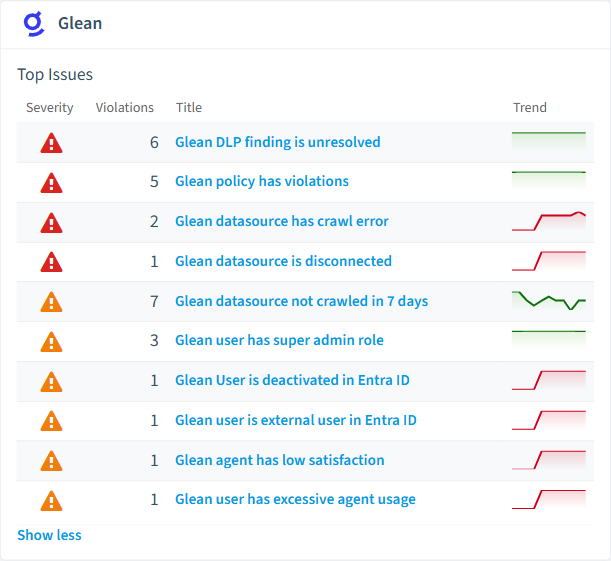
Glean datasource is disconnected
Detects Glean datasources that are currently disabled or disconnected
High Operation -
Glean policy has violations
Detects Glean governance policies with active violations
High Security -
Glean DLP finding is unresolved
Detects unresolved DLP findings in Glean
High Security -
Glean instance with too few owners
Detects Glean instances with less than 2 owners
High Security -
Glean datasource has crawl error
Detects enabled Glean datasources that are in error state
High Operation -
Glean User is deactivated in Entra ID
Detects Glean users who are deactivated in the parent Entra ID
Medium Security
Need a rule that isn't listed? Rencore's Policy Builder lets you create custom policies tailored to your organization. Learn more about the Policy Builder
Reports
7 analytics views and dashboards.
-
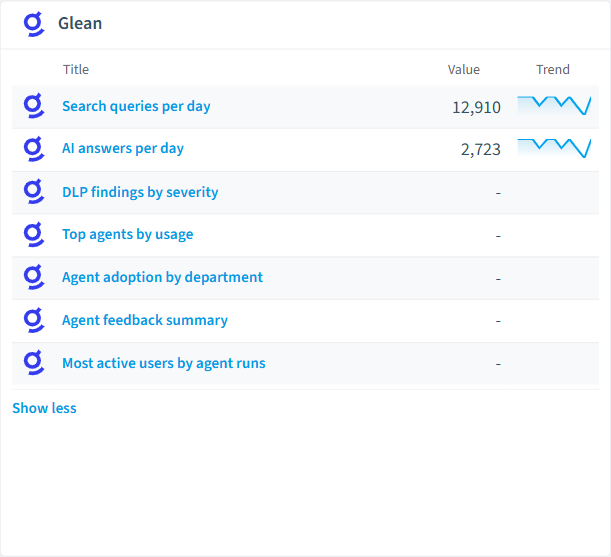
Search queries per day
Shows the number of search queries per day
Area Chart · Adoption
-
AI answers per day
Shows the number of AI answers per day
Area Chart · Adoption
-
DLP findings by severity
Shows DLP findings grouped by severity level
Donut Chart · Security
-
Top agents by usage
Shows the most-used Glean agents by run count
Bar Chart · Adoption
-
Agent adoption by department
Shows Glean agent adoption rate across departments
Bar Chart · Adoption
-
Agent feedback summary
Shows upvotes vs downvotes for Glean agents
Bar Chart · Operation
Automations
2 automated remediation workflows.
-
Disable Glean Agent
Automatically disables a Glean agent after approval
-
Delete Glean User
Automatically deletes a Glean user after approval
Segments
10 data groupings for targeted filtering.
-
Enabled Glean Agents
Shows Glean agents that are currently enabled
-
Disabled Glean Agents
Shows Glean agents that are currently disabled
-
Open DLP Findings
Shows DLP findings with open status
-
Resolved DLP Findings
Shows DLP findings that have been resolved
-
High-usage Glean Agents
Shows Glean agents with more than 100 runs
-
Low-usage Glean Agents
Shows Glean agents with fewer than 5 runs
-
Glean Agents with Negative Feedback
Shows Glean agents that have received downvotes
-
Active Glean Users
Shows Glean users who have been active during the monitoring period
-
Inactive Glean Users
Shows Glean users with no activity during the monitoring period
-
Glean Power Users
Shows Glean users with more than 50 agent runs
Frequently asked questions
Does Rencore support governance for AI tools beyond Microsoft Copilot?
What is Rencore governance?
How do Rencore policies work?
Trusted by











