 Rencore

Exchange Online
Rencore monitors Exchange Online across 31 governance policies, 14 reports, and 35 segments, detecting mailbox security risks, storage issues, and inactive accounts automatically.
Rencore Exchange governance is a set of 31 policies, 14 reports, and 35 segments that continuously audit Exchange Online mailboxes for security violations, operational risks, and license waste. It detects redirect rules that forward email to external domains, mailboxes approaching storage quotas, and inactive accounts still consuming licenses, then triggers approval-based automations to remediate each issue.
117 governance capabilities: 22 inventories · 31 policies · 14 reports · 35 segments · 15 automations
Why govern Exchange Online with Rencore
-
Detect mailbox security risks
Identify mailboxes with external redirect rules, excessive forwarding rules, or transport rules that bypass compliance policies. Each violation includes severity and recommended action.
-
Recover wasted licenses
Find inactive mailboxes (90+ days without send/receive activity) and shared mailboxes without active users. Reclaim Exchange Online licenses by archiving or removing unused accounts.
-
Prevent storage surprises
Monitor mailboxes approaching their prohibit-send quota and large mailboxes without online archives enabled. Get alerted before users lose the ability to send email.
-
Enforce naming and configuration standards
Check for mailboxes without required retention policies, rooms without booking restrictions, and distribution lists with stale membership.
What Rencore discovers
Rencore automatically inventories these Exchange Online object types.
-
Mailbox
All Exchange mailboxes of your users, rooms & equipment
-
Redirect Rule
All registered Exchange mailbox redirect rules
-
Calendar Permission
Permissions configured on Exchange mailbox calendars (sharing and delegation).
-
Exchange Organization Configuration
Tenant-wide Exchange Online configuration settings.
-
Remote Domain
Exchange remote domain entries that govern message handling for specific external domains.
-
Journal Rule
Exchange journal rules that capture copies of messages to a journal recipient (compliance / legal hold).
How Exchange governance works in Rencore
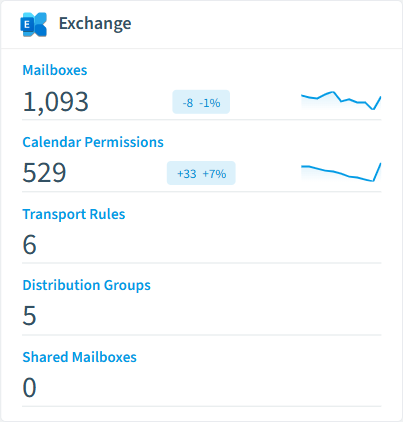
Rencore connects to Exchange Online via Microsoft Graph API and inventories every mailbox, distribution list, and transport rule in the tenant. Policies run on a scheduled basis and compare each object against governance rules, flagging violations with severity levels (High, Medium, Low) and providing actionable descriptions.
Who uses Exchange governance
IT administrators use Exchange governance to stay ahead of storage quota issues and mailbox sprawl. Security teams use it to detect redirect rules that could exfiltrate email data. Compliance officers rely on the reports to demonstrate that inactive mailboxes are being cleaned up per retention schedules.
Getting started
Connect your Microsoft 365 tenant to Rencore, and Exchange policies activate automatically. No agent installation required | Rencore reads data through Microsoft Graph with read-only permissions and applies all 31 policies within the first scan cycle.
Policies
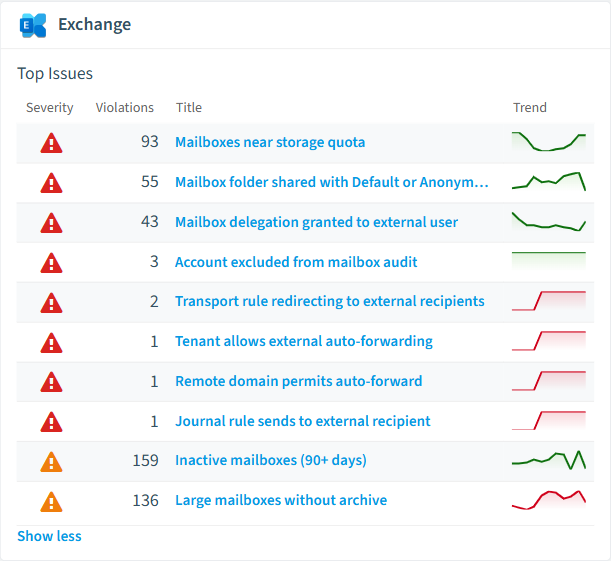
31 governance rules that detect violations and risks.
-
Mailboxes with external redirect rules
Shows mailboxes which have redirect rules that redirect to external domains
High Security -
Mailboxes near storage quota
Shows mailboxes that have used more than 80% of their prohibit-send quota.
High Operation -
Tenant allows external auto-forwarding
Detects when the outbound spam policy 'AutoForwardingMode' is not set to 'Off', allowing users to auto-forward mail externally.
High Security -
Remote domain permits auto-forward
Detects remote domains where automatic forwarding is allowed.
High Security -
Admin audit log disabled
Detects when the Exchange admin audit log is disabled, preventing forensic reconstruction of admin actions.
High Security -
Journal rule sends to external recipient
Detects Exchange journal rules whose journal mailbox is in an external domain.
High Security
Need a rule that isn't listed? Rencore's Policy Builder lets you create custom policies tailored to your organization. Learn more about the Policy Builder
Reports
14 analytics views and dashboards.
-
Mailboxes by type
Distribution of mailboxes by user purpose (user, shared, room, equipment).
Pie Chart · Operation
-
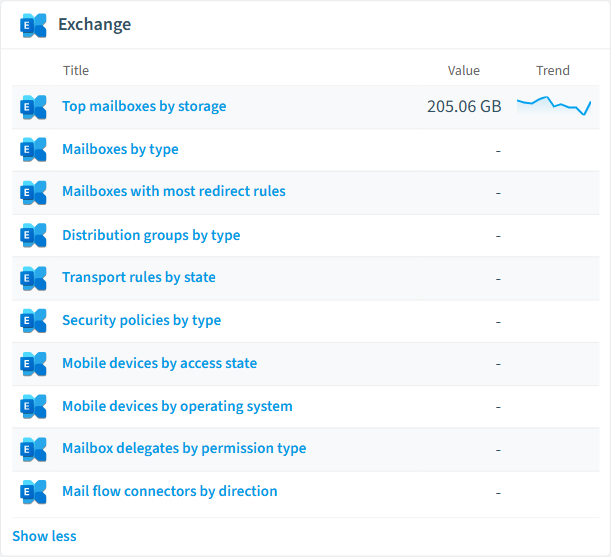
Top mailboxes by storage
Top 10 mailboxes by total storage used.
Bar Chart · Operation
-
Mailboxes with most redirect rules
Top 10 mailboxes ranked by the number of redirect rules they have.
Bar Chart · Security
-
Distribution groups by type
Distribution of Exchange distribution groups by group type.
Pie Chart · Operation
-
Transport rules by state
Distribution of Exchange transport rules by enabled or disabled state.
Pie Chart · Security
-
Security policies by type
Distribution of Defender and EOP security policies by policy type.
Pie Chart · Security
Automations
15 automated remediation workflows.
-
Disable Transport Rule
Disables an Exchange transport rule that redirects or BCC's to external recipients
-
Block External Auto-Forwarding
Sets the outbound spam filter AutoForwardingMode to Off to block tenant-wide external forwarding
-
Disable Remote Domain Auto-Forward
Disables auto-forwarding on a remote domain entry to prevent mail exfiltration
-
Enable Admin Audit Log
Enables the Exchange admin audit log to ensure forensic traceability
-
Disable Journal Rule
Disables a journal rule that sends copies to an external recipient
-
Remove External Mailbox Permission
Removes a mailbox delegation (FullAccess/SendAs) granted to an external user
-
Reset Calendar Permission
Resets a mailbox folder permission to None, revoking external or anonymous calendar sharing
-
Enable DKIM Signing
Enables DKIM signing on an accepted domain to prevent email spoofing
-
Restrict Distribution Group to Internal
Enables sender authentication so only internal senders can deliver to the distribution group
-
Remove Audit Bypass
Disables audit bypass on an account so all mailbox activity is logged
-
Disable Safe Links Click-Through
Prevents users from clicking through Safe Links warnings on phishing URLs
-
Disable Auto-Reply
Disables the automatic reply (out-of-office) on a mailbox
-
Restrict Auto-Reply Audience
Restricts auto-reply external audience to None to prevent information leakage to external senders
-
Enable Mailbox Archive
Enables the online archive on a large mailbox to offload older content
-
Remove Mobile Device
Removes a stale Exchange ActiveSync device partnership
Segments
35 data groupings for targeted filtering.
-
User mailboxes
Shows mailboxes owned by single users
-
Shared Mailboxes
Shows mailboxes shared by multiple users
-
Inactive Mailboxes
Mailboxes with no send/receive/read activity in the last 90 days.
-
Mailboxes Near Quota
Mailboxes that have used more than 80% of their prohibit-send quota.
-
Large Mailboxes
Mailboxes whose total storage exceeds 50 GB.
-
Archived Mailboxes
Mailboxes that have an online archive enabled.
-
Room & Equipment Mailboxes
Mailboxes whose purpose is a room or equipment resource.
-
Mailboxes with Auto-Reply
Mailboxes that have an automatic reply currently enabled or scheduled.
-
DLs accepting external mail
Distribution groups that accept messages from external senders.
-
DLs without owners
Distribution groups that have no assigned owners.
-
DLs hidden from GAL
Distribution groups hidden from the global address list.
-
Dynamic distribution groups
Distribution groups with membership determined by a recipient filter.
-
Enabled transport rules
Transport rules that are currently enabled and enforcing.
-
Audit-mode transport rules
Transport rules running in audit or audit-and-notify mode.
-
Rules with external redirect
Transport rules that redirect messages to external recipients.
-
Inbound connectors
Mail flow connectors handling inbound mail delivery.
-
Outbound connectors
Mail flow connectors handling outbound mail routing.
-
Connectors without TLS
Mail flow connectors that do not require TLS encryption.
-
Stale mobile devices
Mobile device partnerships with no successful sync in over 90 days.
-
Blocked or quarantined devices
Mobile devices whose access state is Blocked or Quarantined.
-
Policies drifting from Standard
Defender and EOP policies that deviate from Microsoft's Standard protection baseline.
-
Disabled security policies
Defender and EOP security policies that are currently disabled.
-
Full Access delegates
Mailbox delegations granting Full Access permission.
-
External delegates
Mailbox delegations granted to external users.
-
Default/Anonymous permissions
Folder permissions granted to the Default or Anonymous identity.
-
Permissions with write access
Folder permissions that grant write or higher access.
-
Room mailboxes
Resource mailboxes representing meeting rooms.
-
Equipment mailboxes
Resource mailboxes representing shared equipment.
-
Resources without delegates
Resource mailboxes that have no booking delegates assigned.
-
Direct role assignments
Exchange RBAC role assignments made directly to users, bypassing role groups.
-
Domains without DKIM
Accepted domains that do not have DKIM signing enabled.
-
Audit-bypassed accounts
Accounts excluded from mailbox audit logging.
-
Domains allowing auto-forward
Remote domains that permit automatic mail forwarding.
-
Journal rules to external
Journal rules sending copies to external recipients.
-
External calendar sharing
Calendar permissions granted to users outside the organization.
Frequently asked questions
What is Exchange governance?
How many Exchange governance policies does Rencore offer?
What is Rencore governance?
Trusted by











