
Copilot Studio

Rencore monitors Copilot Studio across 12 governance policies, 6 reports, and 12 inventories, detecting agent sprawl, unvetted data connections, and lifecycle issues automatically.

Published For M365 Product Owner, IT Admin, CISO
AI & AgentsDigital Workplace
Definition

Rencore Copilot Studio governance is a set of 12 policies, 6 reports, 10 segments, and 12 inventories that continuously audit Microsoft Copilot Studio agents, their connected data sources, and publishing status. It detects agents accessing sensitive data without approval, published agents without recent updates, and environments with excessive agent counts, giving IT control over the organization's AI agent landscape.

See Copilot Studio in Rencore

Step 1 of 4

45 governance capabilities: 12 inventories · 12 policies · 6 reports · 10 segments · 3 automations · 1 provisioning templates

Why govern Copilot Studio with Rencore

Control agent sprawl

Detect Copilot Studio environments with excessive agent counts, agents without assigned owners, and published agents without recent activity. Prevent uncontrolled agent proliferation across your organization.

Govern data connections

Identify agents connected to sensitive data sources, knowledge bases pulling from unvetted external sites, and connectors accessing APIs outside approved lists.

Manage agent lifecycle

Flag agents published without testing, agents not updated in 90+ days, and draft agents consuming resources. Reports show agent activity trends and usage patterns.

What Rencore discovers

Rencore automatically inventories these Copilot Studio object types.
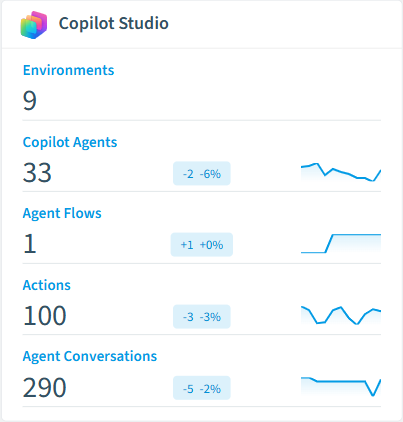
Environment
All Copilot environments in your tenant
Pay-as-you-go Plan
A pay-as-you-go plan is a group of one or more environments that you can configure to bill to Azure.
Tenant Settings
Copilot Studio related tenant settings
Copilot Agent
Agents created inside Copilot Studio.
Agent Flow
Agent Flows created inside Copilot Studio.
Microsoft Copilot
All Microsoft Copilots
Copilot Studio inventory card in Rencore

How Copilot Studio governance works in Rencore

Rencore connects to Copilot Studio via Microsoft Graph and Power Platform APIs, inventorying agents, environments, data connections, knowledge bases, and publishing configurations. Policies run on every scan cycle and evaluate each agent against governance rules, flagging sprawl, security, and lifecycle issues.

The AI agent governance imperative

Copilot Studio makes it easy for business users to build and publish AI agents. That ease of creation becomes a governance challenge when dozens of agents access sensitive data, connect to external APIs, or run without oversight. Rencore applies the same governance rigor to Copilot Studio agents that organizations already expect for their M365 workloads.

Who uses Copilot Studio governance

M365 product owners use it to maintain an up-to-date inventory of all agents across environments. CISOs review data connection policies to ensure agents only access approved data sources. IT administrators track agent lifecycle to identify and retire stale agents.

Getting started

Connect your Microsoft 365 tenant. Copilot Studio policies activate alongside your existing M365 governance. Rencore scans all environments and agents automatically on every cycle.

Policies

12 governance rules that detect violations and risks.
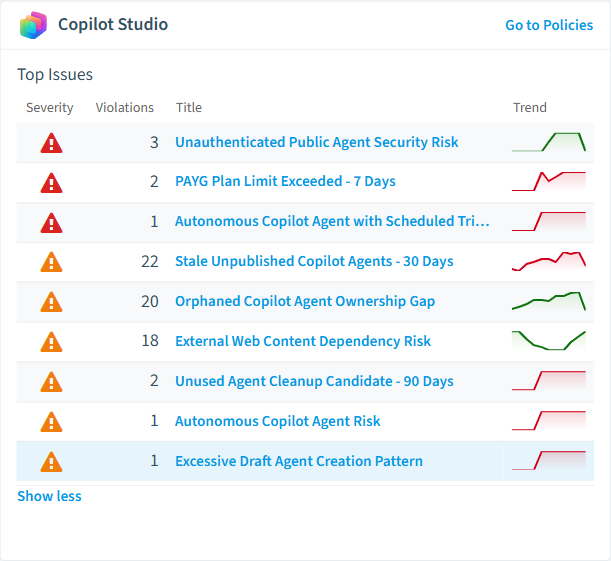
Copilot Studio policies card in Rencore
Agent is accessible by everyone
Agents shared with everyone have the broadest exposure, raising the likelihood that a misconfiguration is exploited.
High Security
Unauthenticated Public Agent Security Risk
Identifies agents exposed publicly without authentication requirements, creating security risks requiring remediation
High Security
Confidential Site Referenced in Copilot Agent
Detects agents connected to SharePoint sites labeled with sensitivity classifications, risking unauthorized data access
High Security
Autonomous Copilot Agent with Scheduled Trigger
Flags agents with automated recurring execution that may generate uncontrolled costs without human oversight
High Costs
PAYG Plan Limit Exceeded - 7 Days
Flags pay-as-you-go plans that exceed a billing amount of 250 within 7 days, requiring billing plan review
High Costs
Agent is published
Published agents are accessible to users, raising the likelihood that any issue with the agent has real-world impact.
Medium Adoption

Need a rule that isn't listed? Rencore's Policy Builder lets you create custom policies tailored to your organization.

Reports

6 analytics views and dashboards.
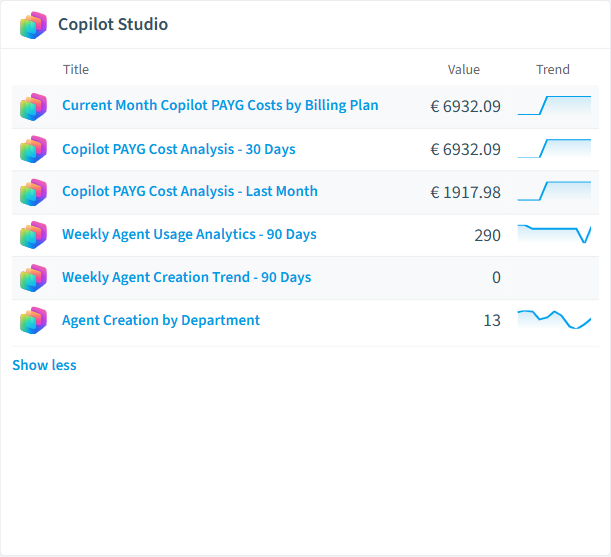
Current Month Copilot PAYG Costs by Billing Plan
Tracks current monthʼs pay-as-you-go costs across all Copilot billing plans to monitor spending
Bar Chart · Costs
Copilot PAYG Cost Analysis - 30 Days
Analyzes last 30 days pay-as-you-go costs by billing plan for budgeting
Bar Chart · Costs
Copilot PAYG Cost Analysis - Last Month
Analyzes completed monthʼs pay-as-you-go costs by billing plan for budgeting
Bar Chart · Costs
Weekly Agent Creation Trend - 90 Days
Visualizes agent creation patterns over 90 days to identify growth trends and potential sprawl
Column Chart · Sprawl
Weekly Agent Usage Analytics - 90 Days
Tracks conversation volumes across all agents over 90 days to measure adoption and identify usage patterns
Column Chart · Adoption
Agent Creation by Department
Ranks departments by agent creation volume over 90 days to identify shadow IT risks and training needs
Donut Chart · Adoption
Copilot Studio reports card in Rencore

Automations

3 automated remediation workflows.

Delete Agent directly
Deletes a Copilot Agent without asking the creator
Delete Agent with approval from creator
Sends an email to the creator and ask for approval to delete the Copilot agent. If creator is not responding within 30 days agent will be deleted.
Provision Copilot Agent
Allow provisioning of Copilot Agents with approval and applied policies

Segments

10 data groupings for targeted filtering.

Published Copilot AgentsAutonomous AgentsUsers creating custom agentsSharepoint and OneDrive KnowledgePublic Website KnowledgeDataverse KnowledgeFiles KnowledgeConversations in TeamsConversations in M365 CopilotConversations in Copilot Studio

Provisioning templates

1 resource creation templates.

Provision Copilot Agent
Allow provisioning of Copilot Agents with approval and applied policies

Frequently asked questions

How does Rencore govern AI agents beyond Microsoft Copilot?
Rencore connects to 15+ AI platforms including Claude, OpenAI, Gemini, GitHub Copilot, Cursor, Windsurf, AWS Bedrock, Azure AI Foundry, Glean, and LangDock. Each connector inventories users, workspaces, API keys, and costs with vendor-specific governance policies. Cross-vendor dashboards show total AI spend, access patterns, and policy violations from a single governance console.
What is Rencore governance?
Rencore governance is a SaaS platform that continuously monitors your Microsoft 365 tenant for policy violations, configuration drift, and security risks across SharePoint, Teams, Power Platform, Copilot, and AI Agents. It automates compliance evidence collection, surfaces oversharing and sprawl, and provides actionable remediation workflows, reducing manual audit effort by up to 80%.
How do Rencore policies work?
Rencore ships with hundreds of pre-built policies that detect governance violations across every connector, oversharing, sprawl, cost overruns, security risks, and compliance gaps. Policies run on a continuous schedule, evaluate each discovered object against configurable rules, and flag violations with severity (High, Medium, Low), category, and a recommended action.

Related guides

Trusted by

MAPALBAMVille de LuxembourgWACKERGRUNDFOSAMGENOsramLufthansaThyssenKruppSunrisePattern







