 Rencore

Copilot Studio
Rencore monitors Copilot Studio across 10 governance policies, 6 reports, and 12 inventories, detecting agent sprawl, unvetted data connections, and lifecycle issues automatically.
Rencore Copilot Studio governance is a set of 10 policies, 6 reports, 10 segments, and 12 inventories that continuously audit Microsoft Copilot Studio agents, their connected data sources, and publishing status. It detects agents accessing sensitive data without approval, published agents without recent updates, and environments with excessive agent counts, giving IT control over the organization's AI agent landscape.
43 governance capabilities: 12 inventories · 10 policies · 6 reports · 10 segments · 3 automations · 1 provisioning templates
Why govern Copilot Studio with Rencore
-
Control agent sprawl
Detect Copilot Studio environments with excessive agent counts, agents without assigned owners, and published agents without recent activity. Prevent uncontrolled agent proliferation across your organization.
-
Govern data connections
Identify agents connected to sensitive data sources, knowledge bases pulling from unvetted external sites, and connectors accessing APIs outside approved lists.
-
Manage agent lifecycle
Flag agents published without testing, agents not updated in 90+ days, and draft agents consuming resources. Reports show agent activity trends and usage patterns.
What Rencore discovers
Rencore automatically inventories these Copilot Studio object types.
-
Environment
All Copilot environments in your tenant
-
Pay-as-you-go Plan
A pay-as-you-go plan is a group of one or more environments that you can configure to bill to Azure.
-
Tenant Settings
Copilot Studio related tenant settings
-
Copilot Agent
Agents created inside Copilot Studio.
-
Agent Flow
Agent Flows created inside Copilot Studio.
-
Microsoft Copilot
All Microsoft Copilots
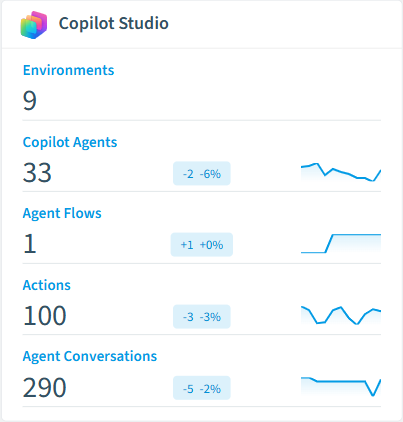
How Copilot Studio governance works in Rencore
Rencore connects to Copilot Studio via Microsoft Graph and Power Platform APIs, inventorying agents, environments, data connections, knowledge bases, and publishing configurations. Policies run on every scan cycle and evaluate each agent against governance rules, flagging sprawl, security, and lifecycle issues.
The AI agent governance imperative
Copilot Studio makes it easy for business users to build and publish AI agents. That ease of creation becomes a governance challenge when dozens of agents access sensitive data, connect to external APIs, or run without oversight. Rencore applies the same governance rigor to Copilot Studio agents that organizations already expect for their M365 workloads.
Who uses Copilot Studio governance
M365 product owners use it to maintain an up-to-date inventory of all agents across environments. CISOs review data connection policies to ensure agents only access approved data sources. IT administrators track agent lifecycle to identify and retire stale agents.
Getting started
Connect your Microsoft 365 tenant. Copilot Studio policies activate alongside your existing M365 governance. Rencore scans all environments and agents automatically on every cycle.
Policies
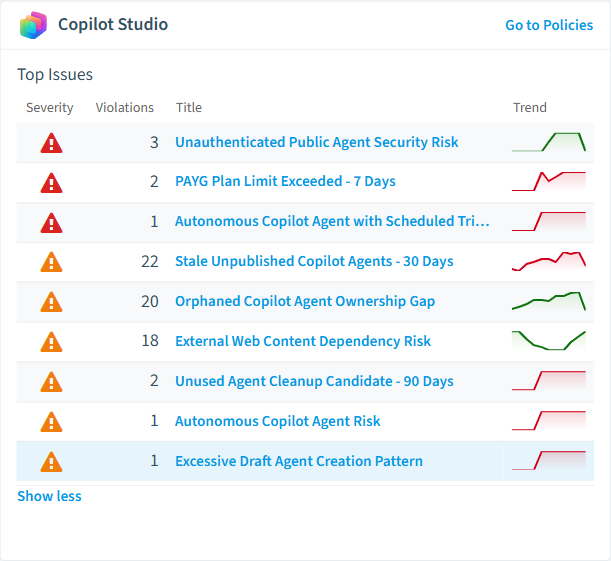
10 governance rules that detect violations and risks.
-
Unauthenticated Public Agent Security Risk
Identifies agents exposed publicly without authentication requirements, creating security risks requiring remediation
High Security -
Confidential Site Referenced in Copilot Agent
Detects agents connected to SharePoint sites labeled with sensitivity classifications, risking unauthorized data access
High Security -
Autonomous Copilot Agent with Scheduled Trigger
Flags agents with automated recurring execution that may generate uncontrolled costs without human oversight
High Costs -
PAYG Plan Limit Exceeded - 7 Days
Flags pay-as-you-go plans that exceed a billing amount of 250 within 7 days, requiring billing plan review
High Costs -
External Web Content Dependency Risk
Identifies agents relying on public websites as knowledge sources, creating reliability and content control risks
Medium External Access -
Autonomous Copilot Agent Risk
Identifies agents operating without user interaction via email or scheduled triggers, requiring additional oversight
Medium Costs
Need a rule that isn't listed? Rencore's Policy Builder lets you create custom policies tailored to your organization. Learn more about the Policy Builder
Reports
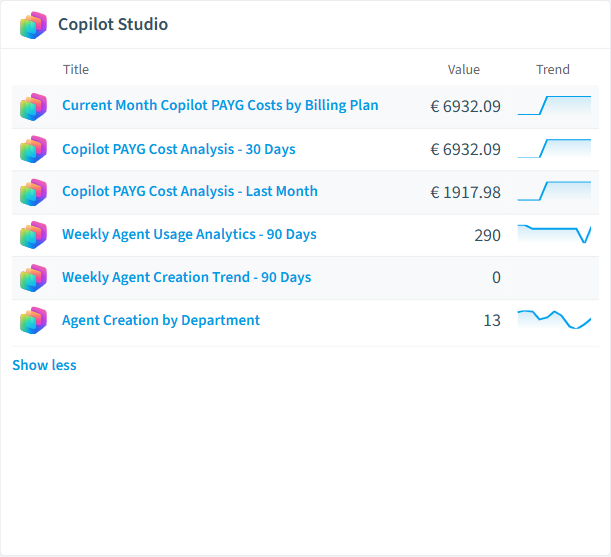
6 analytics views and dashboards.
-
Current Month Copilot PAYG Costs by Billing Plan
Tracks current monthʼs pay-as-you-go costs across all Copilot billing plans to monitor spending
Bar Chart · Costs
-
Copilot PAYG Cost Analysis - 30 Days
Analyzes last 30 days pay-as-you-go costs by billing plan for budgeting
Bar Chart · Costs
-
Copilot PAYG Cost Analysis - Last Month
Analyzes completed monthʼs pay-as-you-go costs by billing plan for budgeting
Bar Chart · Costs
-
Weekly Agent Creation Trend - 90 Days
Visualizes agent creation patterns over 90 days to identify growth trends and potential sprawl
Column Chart · Sprawl
-
Weekly Agent Usage Analytics - 90 Days
Tracks conversation volumes across all agents over 90 days to measure adoption and identify usage patterns
Column Chart · Adoption
-
Agent Creation by Department
Ranks departments by agent creation volume over 90 days to identify shadow IT risks and training needs
Donut Chart · Adoption
Automations
3 automated remediation workflows.
-
Delete Agent directly
Deletes a Copilot Agent without asking the creator
-
Delete Agent with approval from creator
Sends an email to the creator and ask for approval to delete the Copilot agent. If creator is not responding within 30 days agent will be deleted.
-
Provision Copilot Agent
Allow provisioning of Copilot Agents with approval and applied policies
Segments
10 data groupings for targeted filtering.
-
Published Copilot Agents
List agents that are currently published
-
Autonomous Agents
Shows agents that have an external trigger like email or recurrance
-
Users creating custom agents
Unique users which are creating agents in last 30 days
-
Sharepoint and OneDrive Knowledge
Knowledge using SharePoint or OneDrive as data source
-
Public Website Knowledge
Knowledge using public websites as data source
-
Dataverse Knowledge
Knowledge using Dataverse as data source
-
Files Knowledge
Knowledge using uploaded files as data source
-
Conversations in Teams
Identifies Agent conversation that happened inside Teams
-
Conversations in M365 Copilot
Identifies Agent conversation that happened inside M365 Copilot
-
Conversations in Copilot Studio
Identifies Agent conversation that happened inside Copilot Studio
Provisioning Templates
1 resource creation templates.
-
Provision Copilot Agent
Allow provisioning of Copilot Agents with approval and applied policies
Frequently asked questions
How does Rencore govern AI agents beyond Microsoft Copilot?
What is Rencore governance?
How do Rencore policies work?
Trusted by











