
Private Preview

Confluence

Rencore monitors Confluence Cloud across 28 governance policies, 13 reports, and 15 inventories, detecting space sprawl, external sharing, app risk, and unused licenses automatically.

Last reviewed For IT Admin, Head of IT, CISO
Digital Workplace

Confluence is in private preview. Join the waiting list and we will reach out when access opens up.

Join the waiting list
Definition

Rencore Confluence governance is a set of 28 policies, 13 reports, 16 segments, and 15 inventories that continuously audit Atlassian Confluence Cloud for sprawl, access, app, and lifecycle risk. It detects spaces with anonymous access, pages shared with external users, third-party apps with broad admin scope, and licensed seats held by inactive users, with 8 automated remediation actions to deactivate users, archive spaces, and remove permissions.

See Confluence in Rencore

Step 1 of 3

89 governance capabilities: 15 inventories · 28 policies · 13 reports · 16 segments · 8 automations

Why govern Confluence with Rencore

Control space and page sprawl

Detect spaces inactive for 365+ days, empty spaces, orphan pages, stale pages, and personal spaces of inactive users. Archive at scale with automated workflows.

Manage external access and exposure

Find spaces with anonymous access, pages granting view to anonymous users, external users holding space-admin permissions, and external accounts still active after 30 days of inactivity.

Govern Confluence apps

Inventory every installed app, surface apps with broad admin scopes, outdated apps, and inactive apps. Disable risky or unused apps directly from Rencore.

Recover unused licenses

Identify licensed Confluence users who have not signed in, plus empty personal spaces tied to inactive accounts. Reclaim seats and reduce Atlassian spend.

What Rencore discovers

Rencore automatically inventories these Confluence object types.
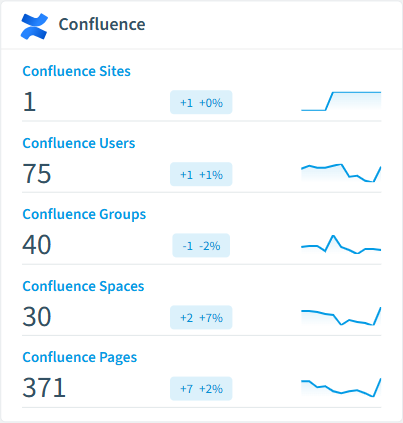
Confluence Site
An Atlassian Confluence Cloud site, identified by its instance hostname (e.g. acme.atlassian.net).
Confluence User
Confluence Cloud user account.
Confluence Group
Confluence Cloud group used to manage user permissions.
Confluence Space
Confluence Cloud space containing pages, blog posts, and attachments.
Confluence Space Permission
Permission assignment on a Confluence space.
Confluence Page
A page in a Confluence space.
Confluence inventory card in Rencore

How Confluence governance works in Rencore

Rencore connects to Confluence Cloud via the Atlassian API and inventories 14 object types: sites, users, groups, spaces, space permissions, pages, blog posts, comments, attachments, templates, apps, audit events, labels, and global permissions. Policies run on every scan cycle and evaluate each object against governance rules, flagging sprawl, access, app, and license risk with severity levels.

Who uses Confluence governance

IT administrators use the 28 policies to maintain a clean, well-governed Confluence environment. CISOs rely on external access and anonymous-access policies to detect data exposure via shared pages. Heads of IT use the 13 activity, storage, and license reports to justify Confluence spend and identify spaces and seats that can be reclaimed.

Getting started

Provide Rencore with Atlassian API credentials. All 28 policies activate on first scan, covering spaces, pages, users, apps, and licensed seats. Eight automations cover the most common remediation paths: deactivate user, archive space, archive page, remove space permission, disable app, remove page restriction, delete personal space, and remove anonymous access. Rencore links Confluence users to Entra ID for cross-platform identity governance.

Policies

28 governance rules that detect violations and risks.
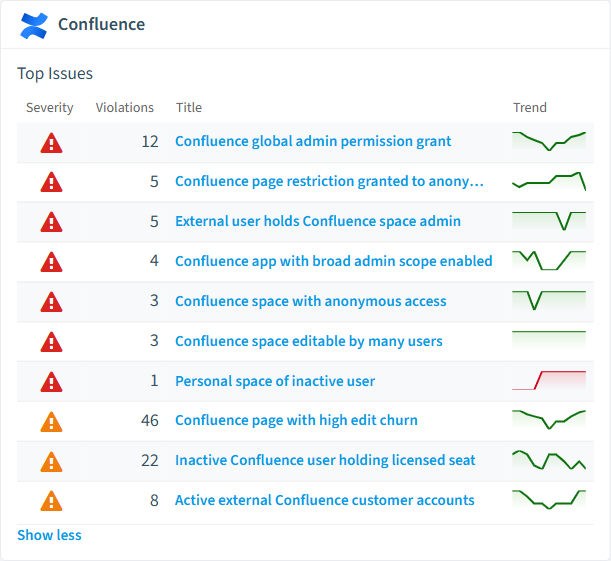
Confluence policies card in Rencore
Space is publicly reachable (anonymous access)
Spaces open to anonymous users are internet-facing, raising the likelihood that any weakness is exploited.
High Security
Principal holds site system-admin grant
System-admin grants have site-wide reach, raising the likelihood that an access issue causes serious impact.
High Security
Confluence space with anonymous access
Detects spaces that allow unauthenticated (anonymous) access.
High Security
Confluence space editable by many users
Detects spaces where more than 50 users or groups have edit permissions.
High Security
Confluence page restriction granted to anonymous
Detects page-level restriction grants that include the 'anonymous' principal.
High Security
Confluence global admin permission grant
Detects principals that hold the global 'confluence-admin' permission.
High Security

Need a rule that isn't listed? Rencore's Policy Builder lets you create custom policies tailored to your organization.

Reports

13 analytics views and dashboards.
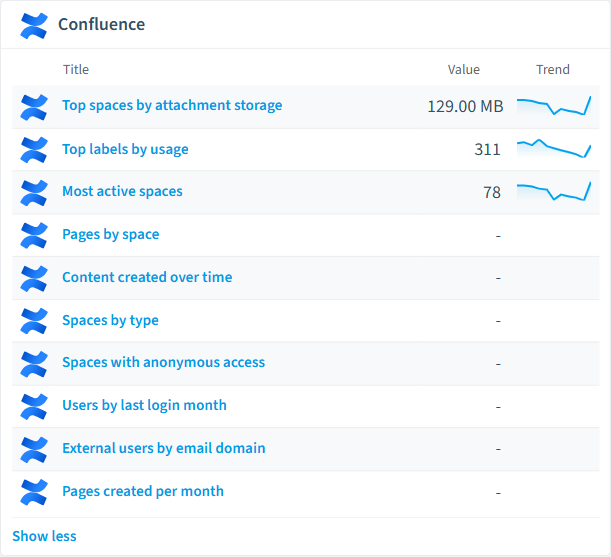
Pages by space
Shows the top spaces by page count.
Bar Chart · Operation
Content created over time
Shows the number of pages created per month over the last 12 months.
Column Chart · Operation
Spaces by type
Shows the distribution of spaces by type (global vs personal).
Bar Chart · Uncategorized
Top spaces by attachment storage
Shows spaces ranked by total attachment storage consumption.
Bar Chart · Costs
Most active spaces
Shows spaces with the highest page count.
Bar Chart · Operation
Spaces with anonymous access
Lists Confluence spaces that have anonymous access enabled.
Bar Chart · Security
Confluence reports card in Rencore

Automations

8 automated remediation workflows.

Deactivate Confluence User
Deactivates a Confluence Cloud user after approval.
Archive Confluence Space
Archives a Confluence space after approval.
Archive Confluence Page
Archives a Confluence page after approval.
Remove Confluence Space Permission
Removes a space permission entry after approval.
Disable Confluence App
Disables a Confluence Connect or Forge app after approval.
Remove Confluence Page Restriction
Removes a page-level restriction grant after approval.
Delete Personal Confluence Space
Deletes a personal Confluence space after approval (refuses non-personal spaces).
Remove Anonymous Access from Confluence Space
Removes anonymous access from a Confluence space after approval.

Segments

16 data groupings for targeted filtering.

Inactive Confluence UsersExternal Confluence UsersConfluence App AccountsGlobal SpacesPersonal SpacesArchived SpacesActive SpacesStale Pages (365+ days)Draft PagesEmpty Confluence GroupsSpaces with anonymous accessPersonal spaces of inactive usersGlobal Confluence adminsOutdated Confluence appsSparse Confluence labelsExternal users active in last 30 days

Frequently asked questions

What governance areas does Rencore cover?
Rencore covers six governance pillars: visibility and inventory across all Microsoft 365 services, ready-to-go policies with over 100 pre-built governance checks, compliance and audit evidence collection for regulatory requirements, extensibility and customization through custom policies and automations, cross-department collaboration with shared dashboards and role-based access, and AI and Copilot readiness to prepare tenants for secure AI adoption.
What is Rencore governance?
Rencore governance is a SaaS platform that continuously monitors your Microsoft 365 tenant for policy violations, configuration drift, and security risks across SharePoint, Teams, Power Platform, Copilot, and AI Agents. It automates compliance evidence collection, surfaces oversharing and sprawl, and provides actionable remediation workflows, reducing manual audit effort by up to 80%.
How do Rencore policies work?
Rencore ships with hundreds of pre-built policies that detect governance violations across every connector, oversharing, sprawl, cost overruns, security risks, and compliance gaps. Policies run on a continuous schedule, evaluate each discovered object against configurable rules, and flag violations with severity (High, Medium, Low), category, and a recommended action.

Related guides

Trusted by

MAPALBAMVille de LuxembourgWACKERGRUNDFOSAMGENOsramLufthansaThyssenKruppSunrisePattern







