
Connectors · Atlassian Private Preview

Confluence

Rencore monitors Confluence Cloud across 24 governance policies, 13 reports, and 14 inventories, detecting space sprawl, external sharing, app risk, and unused licenses automatically.

Digital Workplace
Last reviewed For IT Admin, Head of IT, CISO

Confluence is in private preview. Join the waiting list and we will reach out when access opens up.

Join the waiting list

Rencore Confluence governance is a set of 24 policies, 13 reports, 16 segments, and 14 inventories that continuously audit Atlassian Confluence Cloud for sprawl, access, app, and lifecycle risk. It detects spaces with anonymous access, pages shared with external users, third-party apps with broad admin scope, and licensed seats held by inactive users, with 8 automated remediation actions to deactivate users, archive spaces, and remove permissions.

84 governance capabilities: 14 inventories · 24 policies · 13 reports · 16 segments · 8 automations

Why govern Confluence with Rencore

  • Control space and page sprawl

    Detect spaces inactive for 365+ days, empty spaces, orphan pages, stale pages, and personal spaces of inactive users. Archive at scale with automated workflows.

  • Manage external access and exposure

    Find spaces with anonymous access, pages granting view to anonymous users, external users holding space-admin permissions, and external accounts still active after 30 days of inactivity.

  • Govern Confluence apps

    Inventory every installed app, surface apps with broad admin scopes, outdated apps, and inactive apps. Disable risky or unused apps directly from Rencore.

  • Recover unused licenses

    Identify licensed Confluence users who have not signed in, plus empty personal spaces tied to inactive accounts. Reclaim seats and reduce Atlassian spend.

What Rencore discovers

Rencore automatically inventories these Confluence object types.
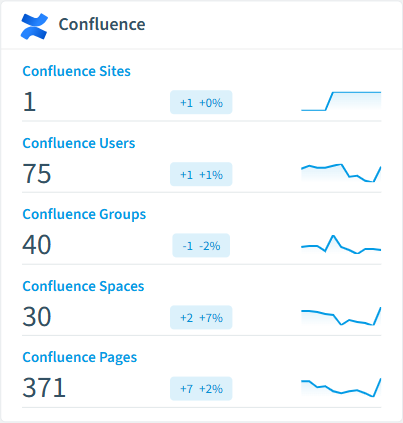
  • Confluence Site

    An Atlassian Confluence Cloud site, identified by its instance hostname (e.g. acme.atlassian.net).

  • Confluence User

    Confluence Cloud user account.

  • Confluence Group

    Confluence Cloud group used to manage user permissions.

  • Confluence Space

    Confluence Cloud space containing pages, blog posts, and attachments.

  • Confluence Space Permission

    Permission assignment on a Confluence space.

  • Confluence Page

    A page in a Confluence space.

Confluence inventory card in Rencore

How Confluence governance works in Rencore

Rencore connects to Confluence Cloud via the Atlassian API and inventories 14 object types: sites, users, groups, spaces, space permissions, pages, blog posts, comments, attachments, templates, apps, audit events, labels, and global permissions. Policies run on every scan cycle and evaluate each object against governance rules, flagging sprawl, access, app, and license risk with severity levels.

Who uses Confluence governance

IT administrators use the 24 policies to maintain a clean, well-governed Confluence environment. CISOs rely on external access and anonymous-access policies to detect data exposure via shared pages. Heads of IT use the 13 activity, storage, and license reports to justify Confluence spend and identify spaces and seats that can be reclaimed.

Getting started

Provide Rencore with Atlassian API credentials. All 24 policies activate on first scan, covering spaces, pages, users, apps, and licensed seats. Eight automations cover the most common remediation paths: deactivate user, archive space, archive page, remove space permission, disable app, remove page restriction, delete personal space, and remove anonymous access. Rencore links Confluence users to Entra ID for cross-platform identity governance.

Policies

24 governance rules that detect violations and risks.
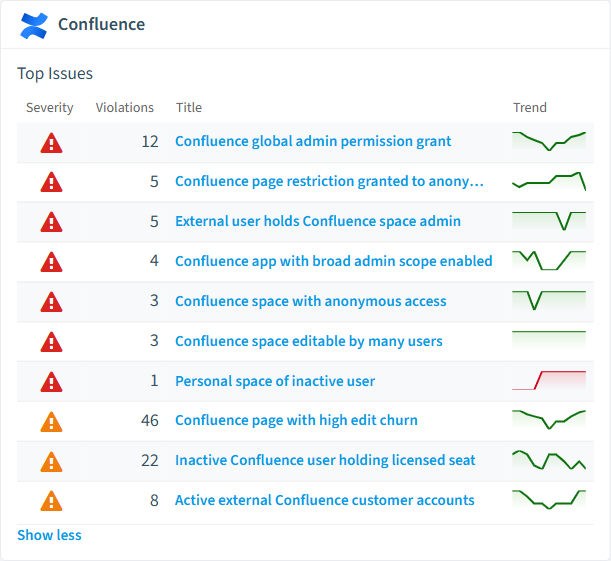
Confluence policies card in Rencore
  • Confluence space with anonymous access

    Detects spaces that allow unauthenticated (anonymous) access.

    High Security
  • Confluence space editable by many users

    Detects spaces where more than 50 users or groups have edit permissions.

    High Security
  • Confluence page restriction granted to anonymous

    Detects page-level restriction grants that include the 'anonymous' principal.

    High Security
  • Confluence global admin permission grant

    Detects principals that hold the global 'confluence-admin' permission.

    High Security
  • Personal space of inactive user

    Detects personal spaces whose owner is no longer an active user.

    High Security
  • External user holds Confluence space admin

    Detects customer-type principals that hold the 'admin' operation on a space.

    High Security

Need a rule that isn't listed? Rencore's Policy Builder lets you create custom policies tailored to your organization. Learn more about the Policy Builder

Reports

13 analytics views and dashboards.
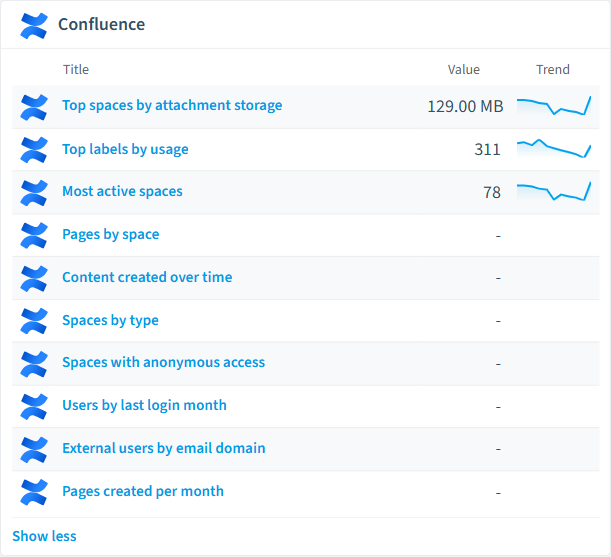
  • Pages by space

    Shows the top spaces by page count.

    Bar Chart · Operation

  • Content created over time

    Shows the number of pages created per month over the last 12 months.

    Column Chart · Operation

  • Spaces by type

    Shows the distribution of spaces by type (global vs personal).

    Bar Chart · Uncategorized

  • Top spaces by attachment storage

    Shows spaces ranked by total attachment storage consumption.

    Bar Chart · Costs

  • Most active spaces

    Shows spaces with the highest page count.

    Bar Chart · Operation

  • Spaces with anonymous access

    Lists Confluence spaces that have anonymous access enabled.

    Bar Chart · Security

Confluence reports card in Rencore

Automations

8 automated remediation workflows.

  • Deactivate Confluence User

    Deactivates a Confluence Cloud user after approval.

  • Archive Confluence Space

    Archives a Confluence space after approval.

  • Archive Confluence Page

    Archives a Confluence page after approval.

  • Remove Confluence Space Permission

    Removes a space permission entry after approval.

  • Disable Confluence App

    Disables a Confluence Connect or Forge app after approval.

  • Remove Confluence Page Restriction

    Removes a page-level restriction grant after approval.

  • Delete Personal Confluence Space

    Deletes a personal Confluence space after approval (refuses non-personal spaces).

  • Remove Anonymous Access from Confluence Space

    Removes anonymous access from a Confluence space after approval.

Segments

16 data groupings for targeted filtering.

  • Inactive Confluence Users

    Shows Confluence user accounts that are deactivated.

  • External Confluence Users

    Shows customer-type Confluence accounts (external collaborators).

  • Confluence App Accounts

    Shows Confluence accounts of type 'app' (third-party integrations).

  • Global Spaces

    Shows Confluence spaces of type 'global'.

  • Personal Spaces

    Shows Confluence personal spaces.

  • Archived Spaces

    Shows archived Confluence spaces.

  • Active Spaces

    Shows current (non-archived) Confluence spaces.

  • Stale Pages (365+ days)

    Shows current pages not modified in over a year.

  • Draft Pages

    Shows Confluence pages in draft status.

  • Empty Confluence Groups

    Shows Confluence groups with zero members.

  • Spaces with anonymous access

    Shows Confluence spaces that have anonymous access enabled.

  • Personal spaces of inactive users

    Shows personal spaces where the owning user is no longer active.

  • Global Confluence admins

    Shows principals that hold the 'confluence-admin' global permission.

  • Outdated Confluence apps

    Shows enabled apps that have not been updated by the vendor in over a year.

  • Sparse Confluence labels

    Shows labels used on fewer than two pieces of content.

  • External users active in last 30 days

    Shows customer-type accounts that have logged in within the last 30 days.

Frequently asked questions

What governance areas does Rencore cover?
Rencore covers six governance pillars: visibility and inventory across all Microsoft 365 services, ready-to-go policies with over 100 pre-built governance checks, compliance and audit evidence collection for regulatory requirements, extensibility and customization through custom policies and automations, cross-department collaboration with shared dashboards and role-based access, and AI and Copilot readiness to prepare tenants for secure AI adoption.
What is Rencore governance?
Rencore governance is a SaaS platform that continuously monitors your Microsoft 365 tenant for policy violations, configuration drift, and security risks across SharePoint, Teams, Power Platform, Copilot, and AI Agents. It automates compliance evidence collection, surfaces oversharing and sprawl, and provides actionable remediation workflows, reducing manual audit effort by up to 80%.
How do Rencore policies work?
Rencore ships with hundreds of pre-built policies that detect governance violations across every connector, oversharing, sprawl, cost overruns, security risks, and compliance gaps. Policies run on a continuous schedule, evaluate each discovered object against configurable rules, and flag violations with severity (High, Medium, Low), category, and a recommended action.

Trusted by

MAPALBAMVille de LuxembourgWACKERGRUNDFOSAMGENOsramLufthansaHoneywellThyssenKruppSunrisePattern

See Rencore in your tenant

Connect your environment in minutes and surface the governance findings that matter on day one.







