 Rencore

Entra ID
Rencore monitors Entra ID across 13 governance policies, 4 reports, and 22 inventories, detecting stale accounts, excessive admin roles, and guest access risks automatically.
Rencore Entra ID governance is a set of 13 policies, 4 reports, 4 segments, and 22 inventories that continuously audit Microsoft Entra ID for identity lifecycle issues, admin role sprawl, and guest access violations. It detects accounts without recent sign-ins, users with excessive directory roles, guest accounts persisting beyond their business justification, and service principals with stale credentials.
43 governance capabilities: 22 inventories · 13 policies · 4 reports · 4 segments
Why govern Entra ID with Rencore
-
Enforce identity lifecycle
Detect accounts without recent sign-in activity, disabled accounts still assigned to groups, and users missing required attributes. Automate cleanup with approval-based workflows.
-
Control admin role sprawl
Find users with excessive directory roles, service principals with stale credentials, and accounts assigned Global Administrator without documented justification.
-
Manage guest access
Identify guest accounts that persist beyond their invitation period, external users without a linked sponsor, and guests with access to sensitive groups or applications.
-
Ground cross-platform identity
Entra ID is the identity backbone for all Rencore connectors. Policies across Slack, Claude, n8n, and other platforms link external users back to Entra ID to detect orphaned access.
What Rencore discovers
Rencore automatically inventories these Entra ID object types.
-
Enterprise Application
All registered Enterprise Applications in Entra ID
-
Device
All devices (computers, phones) that are registered in Entra ID
-
Application registration
All Entra ID application registrations
-
Domain
All registered domains in Entra ID
-
Registration Certificate
All application registration certificate of Entra ID
-
Deleted App Registration Certificate
All deleted application registration certificate of Entra ID
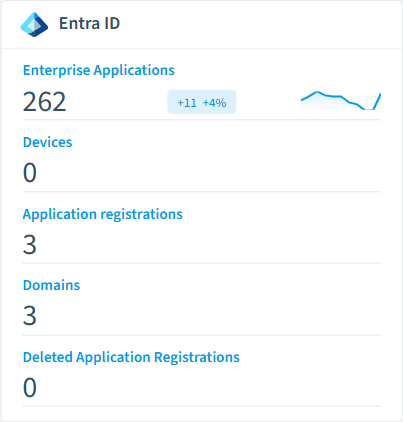
How Entra ID governance works in Rencore
Rencore connects to Microsoft Entra ID via Microsoft Graph API and inventories users, groups, directory roles, service principals, applications, and guest accounts. Policies run on every scan cycle and flag identity lifecycle issues, excessive permissions, and stale credentials with severity levels and recommended actions.
The identity governance foundation
Entra ID is the identity layer for every Microsoft 365 service and most third-party SaaS connectors. Governance gaps in Entra ID cascade into every connected platform. A disabled user in Entra ID who still holds Claude access or Slack membership is a cross-platform risk that starts with identity.
Who uses Entra ID governance
IT administrators use it to maintain clean identity hygiene across the directory. CISOs rely on admin role policies to enforce least-privilege access. M365 product owners use the cross-platform identity linking to detect orphaned access across all connected services.
Getting started
Connect your Microsoft 365 tenant. Entra ID policies activate on first scan, covering users, groups, roles, and guest accounts. No additional configuration beyond the standard Microsoft Graph permissions.
Policies
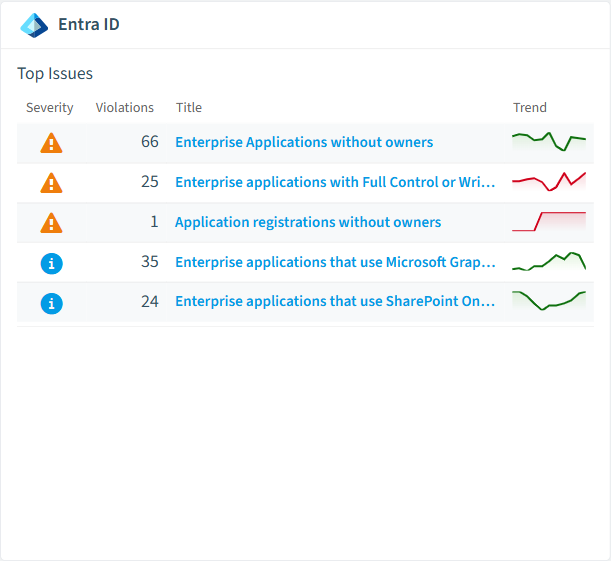
13 governance rules that detect violations and risks.
-
Applications with certificates that are about to expire
Shows Entra ID applications where certificates expire in the next 30 days
High Operation -
Applications with expired certificates
Shows Entra ID applications with expired certificates
High Operation -
Applications with client secrets that are about to expire
Shows Entra ID applications where client secrets expire in the next 30 days
High Operation -
Applications with expired client secrets
Shows Entra ID applications with expired client secrets
High Operation -
Risky Sign-Ins
Shows Sign-Ins with risk state "At Risk"
High Security -
Enterprise applications (SharePoint Add-Ins) with expired certificates or client secrets
Shows Enterprise applications with expired certificates or client secrets. In most cases these applications are SharePoint Add-Ins
Medium Operation
Need a rule that isn't listed? Rencore's Policy Builder lets you create custom policies tailored to your organization. Learn more about the Policy Builder
Reports
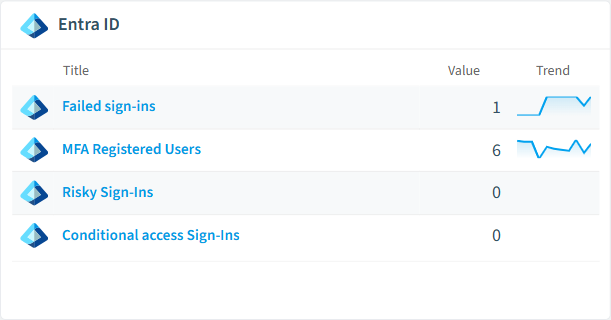
4 analytics views and dashboards.
-
Failed sign-ins
Shows unsuccesfull sign-ins
List · Uncategorized
-
MFA Registered Users
Shows all users with enabled multi factor authentication
List · Uncategorized
-
Risky Sign-Ins
Shows Sign-Ins with Risk State "At Risk"
List · Uncategorized
-
Conditional access Sign-Ins
Shows Sign-Ins using conditional access
List · Uncategorized
Segments
4 data groupings for targeted filtering.
-
Failed sign-ins
Shows unsuccesfull sign-ins
-
MFA Registered Users
Shows all users with enabled multi factor authentication
-
Risky Sign-Ins
Shows Sign-Ins with Risk State "At Risk"
-
Conditional access Sign-Ins
Shows Sign-Ins using conditional access
Frequently asked questions
What governance areas does Rencore cover?
What is Rencore governance?
How do Rencore policies work?
Trusted by











