
Private Preview

Slack

Rencore monitors Slack across 31 governance policies, 8 reports, and 10 inventories, detecting channel sprawl, orphaned guest access, and file sharing risks automatically.

Published For IT Admin, Head of IT, CISO
Digital Workplace

Slack is in private preview. Join the waiting list and we will reach out when access opens up.

Join the waiting list
Definition

Rencore Slack governance is a set of 31 policies, 8 reports, 14 segments, and 10 inventories that continuously audit Slack workspaces for channel sprawl, guest access violations, file sharing risks, and user lifecycle issues. It detects members deactivated in Entra ID who retain Slack access, workspaces with too many admins, external guest members without business justification, and files shared via public URLs.

See Slack in Rencore

Step 1 of 4

80 governance capabilities: 10 inventories · 31 policies · 8 reports · 14 segments · 9 automations

Why govern Slack with Rencore

Control channel sprawl

Detect inactive channels without messages in 90+ days, channels without purpose descriptions, and archived channels still consuming workspace resources. Automate cleanup with approval workflows.

Manage guest access

Find external guest members without business justification, guests with access to too many channels, and members deactivated in Entra ID who still have active Slack accounts.

Secure file sharing

Detect files shared via public URLs, files with external access beyond policy, and workspaces where file sharing settings bypass organizational data protection controls.

Enforce workspace standards

Flag workspaces with too many admins, workspaces missing required app restrictions, and user groups with stale membership. 31 policies cover every aspect of Slack governance.

What Rencore discovers

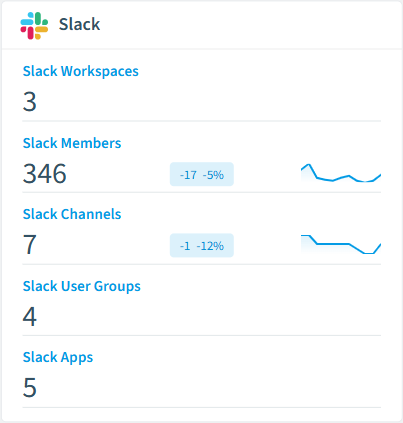
Rencore automatically inventories these Slack object types.
Slack Workspace
A Slack workspace; top-level container for members, channels, user groups, apps and files.
Slack Member
Individual accounts with access to a Slack workspace.
Slack Channel
A Slack channel; public, private, shared or multi-party DM.
Slack User Group
A Slack user group (formerly IDP group).
Slack App
A Slack app installed in the workspace.
Slack File
A file uploaded to a Slack workspace.
Slack inventory card in Rencore

How Slack governance works in Rencore

Rencore connects to Slack via the Slack API and inventories workspaces, members, channels, user groups, apps, and files. It links Slack members to M365 users by email for cross-platform identity governance. Policies run on every scan cycle and flag sprawl, access, and sharing issues.

The multi-platform messaging challenge

Organizations using Slack alongside Microsoft Teams face fragmented messaging governance. A guest in Slack may already be terminated in Entra ID but invisible to Teams-focused governance. Rencore governs both platforms from a single dashboard, detecting identity mismatches that span messaging tools.

Who uses Slack governance

IT administrators use it to maintain clean workspace hygiene and manage channel lifecycle. CISOs rely on guest access and file sharing policies to detect data exposure risks. Heads of IT use the reports to compare messaging governance posture between Slack and Teams.

Getting started

Provide Rencore with Slack API credentials (OAuth tokens). All 31 policies activate on first scan, covering workspaces, channels, members, and files. Rencore links Slack members to Entra ID automatically.

Policies

31 governance rules that detect violations and risks.
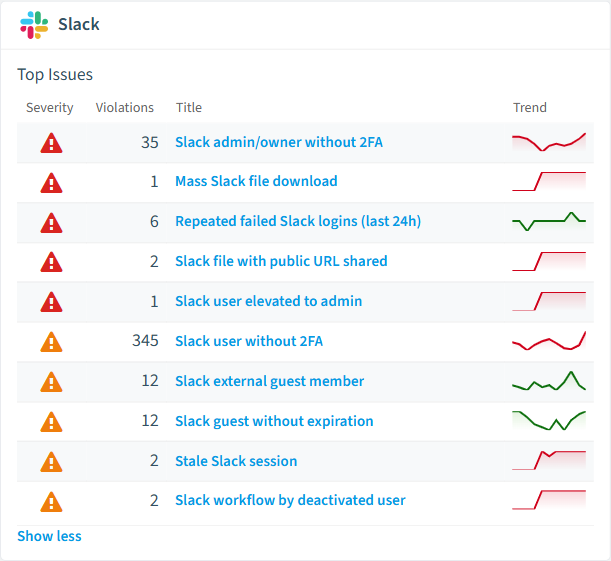
Slack policies card in Rencore
Slack member is privileged
Members with admin privileges are a higher-value target, raising the likelihood that any weakness is exploited.
High Security
Slack channel is shared externally
Externally shared channels are reachable outside the tenant, raising the likelihood of data exposure.
High Security
Slack file is public
Public files are reachable beyond the workspace, raising the likelihood of unauthorized access.
High Security
Slack app holds sensitive scopes
Apps with sensitive scopes can read data and act broadly, raising the likelihood of real-world impact.
High Security
Slack file with public URL shared
Detects Slack files with a public shareable URL.
High Security
Slack app with sensitive scopes (unapproved)
Detects Slack apps holding sensitive scopes that are neither directory-approved nor internal.
High Security

Need a rule that isn't listed? Rencore's Policy Builder lets you create custom policies tailored to your organization.

Reports

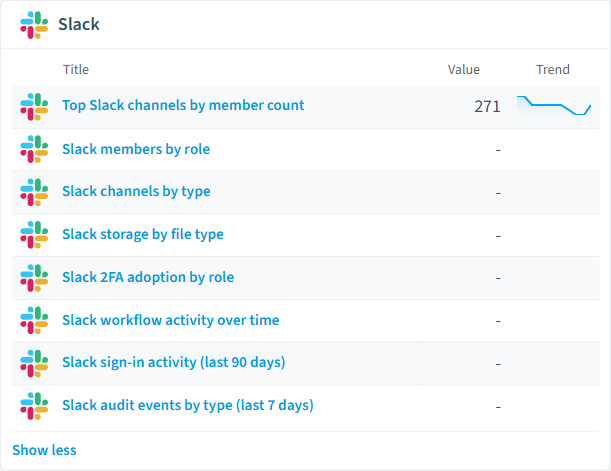
8 analytics views and dashboards.
Slack members by role
Distribution of Slack members across owner, admin, member, guest and bot roles.
Donut Chart · Operation
Slack channels by type
Distribution of active Slack channels across public, private, shared and external-shared.
Donut Chart · Operation
Slack storage by file type
Total file size by Slack file type across the workspace.
Bar Chart · Costs
Slack 2FA adoption by role
Count of active Slack members by role, broken down by whether 2FA is enabled.
Bar Chart · Security
Top Slack channels by member count
The 20 largest active Slack channels by member count.
Bar Chart · Adoption
Slack workflow activity over time
Count of Slack workflows updated per month over the last 12 months.
Line Chart · Adoption
Slack reports card in Rencore

Automations

9 automated remediation workflows.

Remove Slack Member
Automatically removes a member from the Slack workspace after approval
Archive Slack Channel
Automatically archives a Slack channel after approval
Remove Slack App
Automatically removes a Slack app from the workspace after approval
Delete Slack File
Automatically deletes a Slack file after approval
Revoke Slack Session
Automatically revokes an active Slack session after approval
Set Slack User Expiration
Automatically sets an expiration timestamp on a Slack guest member after approval
Remove User from Slack Channel
Automatically removes a member from a Slack channel after approval
Disable Slack User Group
Automatically disables a Slack user group after approval
Unpublish Slack Workflow
Automatically unpublishes a Slack workflow after approval

Segments

14 data groupings for targeted filtering.

Deactivated Slack membersSlack workspace adminsSlack guest membersExternal-shared Slack channelsPublic Slack filesSlack users without 2FASlack admins without 2FAActive Slack sessions (last 7 days)Slack apps with sensitive scopesPublished Slack workflowsSlack guests without expirationFailed Slack logins (last 7 days)External Slack file shares (last 30 days)Slack role elevations (last 30 days)

Frequently asked questions

What governance areas does Rencore cover?
Rencore covers six governance pillars: visibility and inventory across all Microsoft 365 services, ready-to-go policies with over 100 pre-built governance checks, compliance and audit evidence collection for regulatory requirements, extensibility and customization through custom policies and automations, cross-department collaboration with shared dashboards and role-based access, and AI and Copilot readiness to prepare tenants for secure AI adoption.
What is Rencore governance?
Rencore governance is a SaaS platform that continuously monitors your Microsoft 365 tenant for policy violations, configuration drift, and security risks across SharePoint, Teams, Power Platform, Copilot, and AI Agents. It automates compliance evidence collection, surfaces oversharing and sprawl, and provides actionable remediation workflows, reducing manual audit effort by up to 80%.
How do Rencore policies work?
Rencore ships with hundreds of pre-built policies that detect governance violations across every connector, oversharing, sprawl, cost overruns, security risks, and compliance gaps. Policies run on a continuous schedule, evaluate each discovered object against configurable rules, and flag violations with severity (High, Medium, Low), category, and a recommended action.

Related guides

Trusted by

MAPALBAMVille de LuxembourgWACKERGRUNDFOSAMGENOsramLufthansaThyssenKruppSunrisePattern







