
Planner
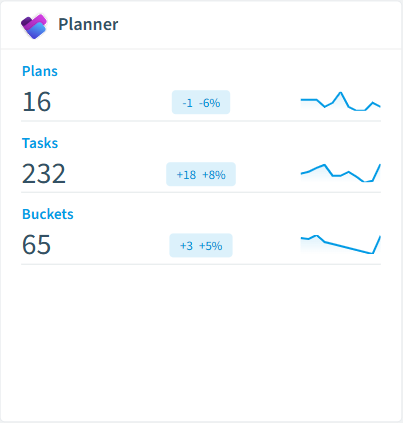
Rencore monitors Microsoft Planner across 27 governance policies, 11 reports, and 3 inventories (plans, tasks, buckets), detecting plan sprawl, overdue task burden, unassigned work, and creator-deleted plans automatically.
Rencore Planner governance is a set of 27 policies, 11 reports, 17 segments, and 3 inventories that audit Microsoft Planner across plans, tasks, and buckets. It detects plans with no activity in 6 or 12 months, plans shared beyond the owning group, plans near the bucket or task limit, urgent overdue or unassigned tasks, and tasks whose creator has been deleted, helping IT keep Planner usage healthy and visible alongside Teams and Groups governance.
See Planner in Rencore
Every Planner object Rencore discovers and inventories across your tenant.
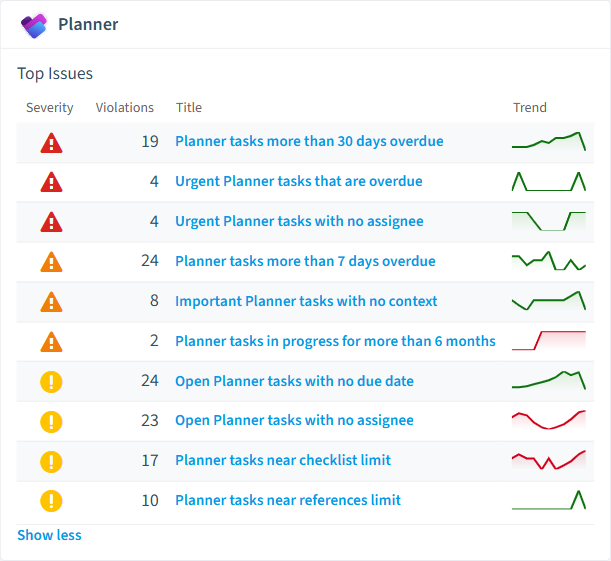
The governance policies Rencore evaluates against Planner, with severity and category.
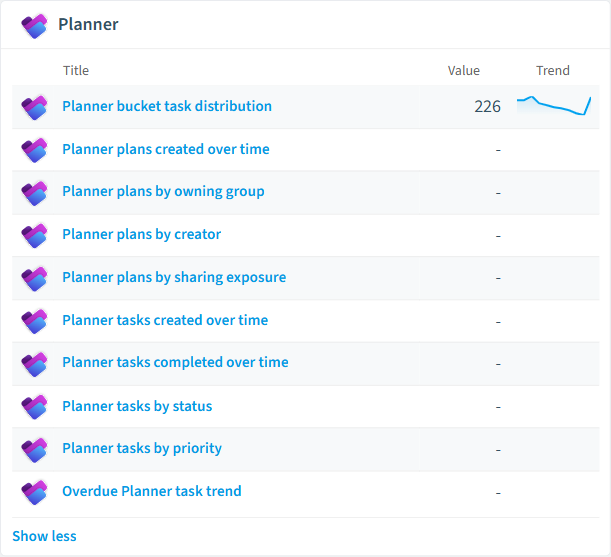
Built-in Planner reports and analytics views in Rencore.
Why govern Planner with Rencore
Control plan sprawl
Detect Planner plans with no activity in 6 or 12 months, empty plans, plans with placeholder titles, plans whose creator has been deleted, and plans shared beyond the owning group. Archive abandoned plans with confidence.
Surface overdue and unassigned work
Flag urgent overdue tasks, urgent tasks with no assignee, tasks more than 7 or 30 days overdue, open tasks with no due date, and tasks stalled in progress for 6 months. Give team leads a real-time view of execution risk.
Keep plans within platform limits
Track plans approaching the bucket and task limits, oversized buckets, plans not using buckets, and tasks near checklist or references limits. Prevent users from hitting Planner ceilings that block productivity.
Standardize new plans
Provisioning templates enforce consistent plan structures, naming conventions, and bucket configurations when new plans are created through Rencore's provisioning workflows.
What Rencore discovers
Rencore automatically inventories these Planner object types.
How Planner governance works in Rencore
Rencore connects to Microsoft Planner via the Microsoft Graph API and inventories three object types (plans, tasks, and buckets) across the tenant. The 27 policies run on every scan cycle, evaluating each plan, task, and bucket against sprawl, execution, and structural rules with severity levels.
Who uses Planner governance
M365 product owners use plan-sprawl and bucket-limit policies to keep Planner usage healthy at tenant scale. IT administrators rely on the 17 reusable segments (active plans, stale plans, externally shared plans, urgent overdue tasks) to drive cleanup and notification campaigns. Team leads use the 11 reports (assignment load by user, overdue task trend, tasks by status and priority) to spot execution risk before it surfaces in management reviews.
Getting started
Connect your Microsoft 365 tenant. All 27 Planner policies activate on first scan alongside your existing M365 governance, with no additional configuration required. One provisioning template enforces consistent plan structures when teams request new plans through Rencore.
Policies
27 governance rules that detect violations and risks.
Need a rule that isn't listed? Rencore's Policy Builder lets you create custom policies tailored to your organization.
Reports
11 analytics views and dashboards.
Automations
1 automated remediation workflows.
Segments
17 data groupings for targeted filtering.
Provisioning templates
1 resource creation templates.
Frequently asked questions
What governance areas does Rencore cover?
What is Rencore governance?
How do Rencore policies work?
Related guides
Trusted by










