
Microsoft 365
Rencore monitors Microsoft 365 Groups across 31 governance policies, 22 reports, and 11 inventories, detecting group sprawl, stale memberships, and lifecycle issues automatically.
Rencore Microsoft 365 Groups governance is a set of 31 policies, 22 reports, 10 segments, and 11 inventories that continuously audit M365 groups, users, and memberships. It detects groups without owners, groups with excessive guest membership, inactive groups consuming resources, and naming convention violations, providing the core governance layer that underpins Teams, SharePoint, and Planner workloads.
See Microsoft 365 in Rencore
Every Microsoft 365 object Rencore discovers and inventories across your tenant.
The governance policies Rencore evaluates against Microsoft 365, with severity and category.
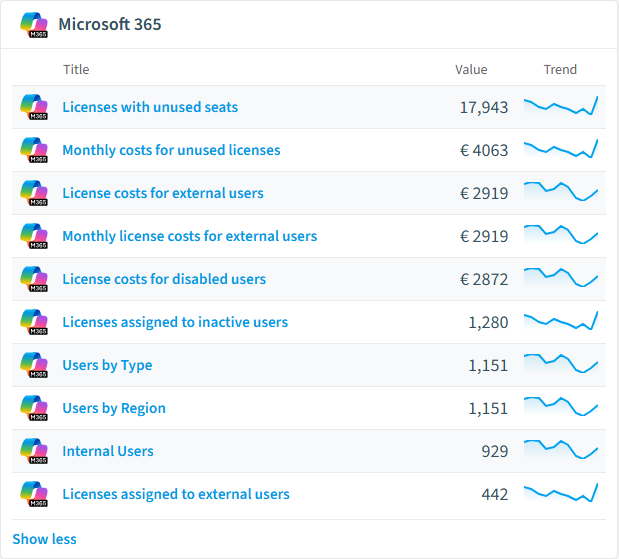
Built-in Microsoft 365 reports and analytics views in Rencore.
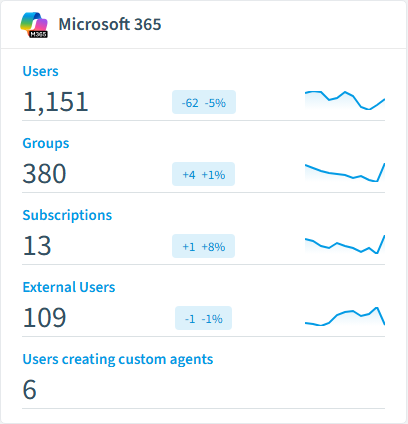
The Microsoft 365 governance dashboard, summarizing risks and status at a glance.
Why govern Microsoft 365 with Rencore
Control group sprawl
Detect groups without owners, groups with no recent activity, and groups created outside approved processes. 31 policies cover every aspect of the group lifecycle from creation to archival.
Manage membership and guests
Find groups with excessive guest members, members who left the organization but retain group access, and distribution lists with stale membership that should be converted or removed.
Enforce naming and classification
Flag groups violating naming conventions, groups missing required sensitivity labels, and groups without proper classification metadata for compliance requirements.
Foundation for M365 governance
Microsoft 365 Groups underpin Teams, SharePoint sites, Planner plans, and shared mailboxes. Group governance is the foundation that all other M365 governance builds on.
What Rencore discovers
Rencore automatically inventories these Microsoft 365 object types.
How Microsoft 365 Groups governance works in Rencore
Rencore connects to Microsoft 365 via Microsoft Graph API and inventories all groups, users, memberships, guest accounts, and group metadata. This is Rencore’s core service connector that provides the identity and group foundation for all other M365 governance policies. 31 policies run on every scan cycle covering sprawl, access, naming, and lifecycle.
The group governance foundation
Every Teams workspace, SharePoint team site, Planner plan, and shared mailbox is backed by a Microsoft 365 Group. Governing groups is governing your entire M365 collaboration layer. Without group governance, sprawl in Teams, SharePoint, and Planner is undetectable.
Who uses Microsoft 365 Groups governance
M365 product owners use it as their primary governance dashboard for the entire tenant. IT administrators track group lifecycle and enforce naming standards. CISOs monitor guest membership and external access patterns across all M365 workloads.
Getting started
Connect your Microsoft 365 tenant. Groups governance activates automatically as the core Rencore connector. All 31 policies run on first scan with no additional configuration.
Policies
31 governance rules that detect violations and risks.
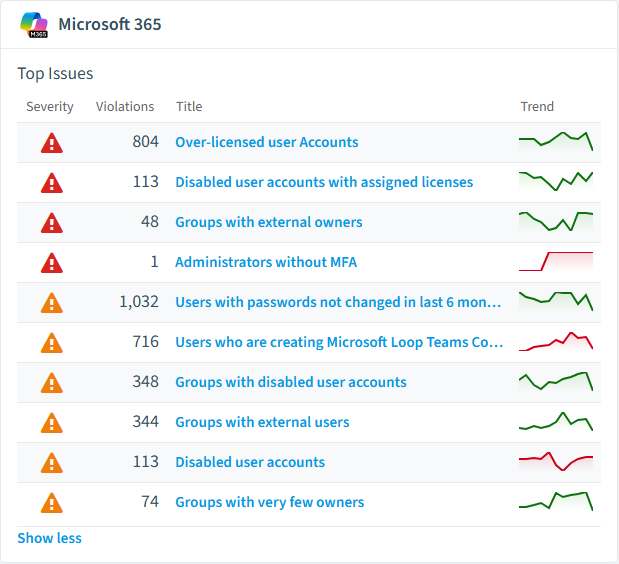
Need a rule that isn't listed? Rencore's Policy Builder lets you create custom policies tailored to your organization.
Reports
22 analytics views and dashboards.
Automations
3 automated remediation workflows.
Segments
10 data groupings for targeted filtering.
Provisioning templates
3 resource creation templates.
Frequently asked questions
What governance areas does Rencore cover?
What is Rencore governance?
How do Rencore policies work?
Related guides
Trusted by










