
Cursor
Rencore monitors Cursor across 26 governance policies, 3 reports, and 10 inventories, detecting cost overruns, unused seats, and MCP server risks automatically.
Cursor is in private preview. Join the waiting list and we will reach out when access opens up.
Join the waiting listRencore Cursor governance is a set of 26 policies, 3 reports, 6 segments, and 10 inventories that audit the Cursor AI coding IDE for cost overruns, unused seats, security gaps, and operational risks. It detects members exceeding spend limits, billing groups without budget controls, MCP servers connected to unapproved endpoints, and inactive users consuming paid seats.
See Cursor in Rencore
Every Cursor object Rencore discovers and inventories across your tenant.
The governance policies Rencore evaluates against Cursor, with severity and category.
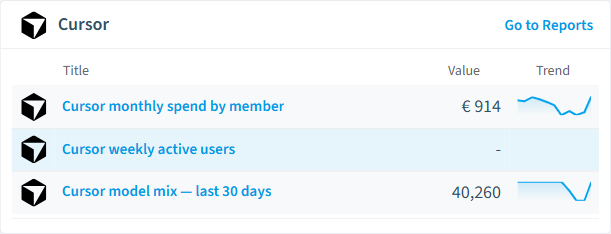
Built-in Cursor reports and analytics views in Rencore.
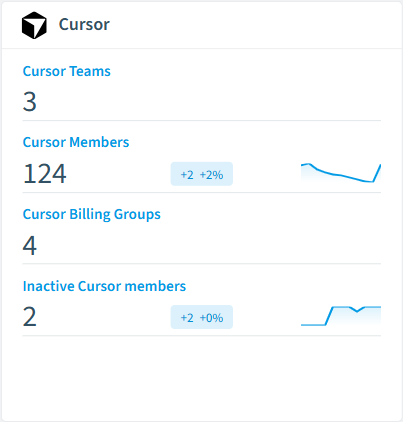
The Cursor governance dashboard, summarizing risks and status at a glance.
Why govern Cursor with Rencore
Control AI coding costs
Track spending at the organization, billing group, and individual member level. Policies alert when a user exceeds their cost limit or a billing group spends beyond its monthly budget.
Manage seat utilization
Detect inactive members who haven't used Cursor in 90 days, seats assigned to users deactivated in Entra ID, and billing groups with more seats than active members.
Govern MCP servers and blocklists
Inventory MCP servers connected to Cursor instances and detect servers pointing to unapproved endpoints. Enforce repository blocklists to prevent code generation on restricted repositories.
What Rencore discovers
Rencore automatically inventories these Cursor object types.
How Cursor governance works in Rencore
Rencore connects to Cursor via the Cursor API and inventories members, billing groups, usage data, spend data, MCP servers, and repository blocklists. Policies run on every scan cycle and flag cost overruns, unused seats, and security issues with severity levels and recommended actions.
The AI coding tool governance gap
Developer teams adopting Cursor face per-seat costs that scale quickly, especially with premium models. Without governance, inactive seats accumulate, individual developers exceed spending limits, and MCP server connections bypass security review. Rencore brings the same governance visibility to AI coding tools that organizations expect for their SaaS platforms.
Who uses Cursor governance
Heads of IT use cost policies to keep AI coding spend within approved budgets. CISOs review MCP server connections and repository blocklists to enforce security boundaries. Engineering leads use adoption reports to measure team productivity gains.
Getting started
Provide Rencore with Cursor API credentials. All 26 policies activate on first scan, covering members, billing groups, usage, and MCP servers. No per-user configuration required.
Policies
26 governance rules that detect violations and risks.
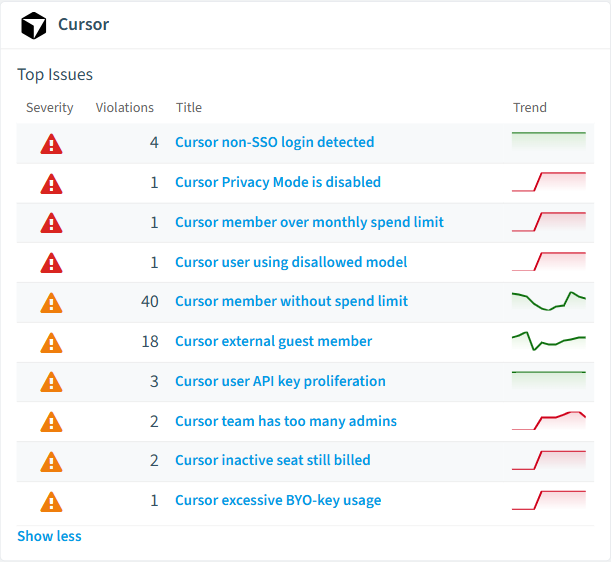
Need a rule that isn't listed? Rencore's Policy Builder lets you create custom policies tailored to your organization.
Reports
3 analytics views and dashboards.
Automations
5 automated remediation workflows.
Segments
6 data groupings for targeted filtering.
Provisioning templates
1 resource creation templates.
Frequently asked questions
Does Rencore support governance for AI tools beyond Microsoft Copilot?
What is Rencore governance?
How do Rencore policies work?
Related guides
Related reading
- AWS BedrockRencore monitors AWS Bedrock across 30 governance policies, 15 reports, and 19 inventories, detecting model access risks, cost overruns, and usage anomalies automatically.
- Microsoft FoundryRencore inventories Azure AI Foundry with 6 inventory types covering projects, hubs, model deployments, and connections for full AI platform visibility.
- Anthropic ClaudeRencore monitors Anthropic Claude across 26 governance policies, 14 reports, and 11 inventories, covering costs, security, adoption, and data protection for your Claude organization.
Trusted by










